Topic: Different types of input devices of a computer system with examples, pictures and explanation:
Topics Covered are:
- Definition of Input Devices
- Functions of Input Devices ( How input devices work? )
- Examples of Input Devices
- Pictures / Images of different input devices
Different Examples of Input Devices With Description
- Keybboard
- Mouse
- Trach Ball
- Trackpad
- Joy Stick
- Light Pen
- Microphone
- Scanner
- Graphic Tablet ( Digitizer )
- Digital Camera
- Touch Screen ( I/O Device / Dual Device - Perform Both Functions input + Output )
INPUT DEVICES ( Definition )
Input devices are used to enter data and instructions into computer memory from external world. Input Device is a hardware part of the computer that is used to enter data and instructions into computer memory. The examples of input devices include: Keyboard, Mouse, Track ball, Track Pad, Joy stick, Touch Screen, Light pen, Scanner, Digital Camera, Microphone, Graphics tablet etc. They (input devices) perform three main functions. |
| Different Types of input devices with examples and description of each computer |
Three Functions of Input Devices
Input devices perform three main functions:
- Input devices Receive data from user. For example, user enters data from keyboard by typing numeric number 5
- Input devices Convert data into binary form [the language of 0 and 1 also called the machine language. Machine language is the only language, a computer can understand directly.]
For example decimal number 5 will be converted to binary number 101.
5/2 quotient =2 remainder =1
2/2 quotient =1 remainder =0
1/2 quotient =0 remainder =1
so we write remainders from bottom to top (101) which is binary equivalent of decimal 5.
- Provide converted data in binary form (101) to computer memory for processing.
Following are the introduction to some popular types of input devices:
1. Key board
 |
| different types of input devices of computer - keyboard |
Keyboard is the most familiar input device. It is most widely used input device to enter data and instructions into the computer. Keyboard has a set of keys like a typewriter. It has alphabetic keys for A,B,C…Z or a,b,c,…z. It has numeric keys like 0,1,2,3,…9. It has function keys F1, F2,…,F12 used to perform specific tasks.
It has other keys used for editing like Delete, Backspace, Home, End, etc.
2. Mouse
 |
| Mouse - Types of input device |
3. Track Ball
 |
| Track ball - a type of pointing input device |
4. Track Pad
 |
| track pad / touch pad input device |
Track pad is a pointing input device. It is used in Lap top computers to control motion of pointer on screen. Track pad is a stationary input device. It has a flat surface of 1.5 to 2 square inch. Finger is moved on this surface to move pointer on screen.
5. Joy stick
 |
| Joy stick - example of input device used for playing computer games |
Joystick is an input device used to play games on computer. It is used to control motion of an object quickly in game with the help of a hand held stick. This stick can be moved forward, backward or side ways. This stick is mounted on a ball. When stick is moved then ball is moved and signals are sent to the computer.
6. Light Pen
 |
| Light pen use as an input device |
Light pen is an input device consisting of a special pen that is connected to a computer's monitor. The user points at the screen with the pen and selects items or chooses commands either by pressing a clip on the side of the light pen or by pressing the light pen against the surface of the screen (the equivalent of performing a mouse click).
7. Microphone
 |
| Microphone: input device to enter sounds and voice in computer |
Microphone is an input device used to enter sounds into the computer. We can record sounds in computer with the help of microphone and sound card.
8. Scanner
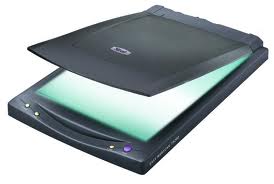 |
| Scanner - another example of input device |
Scanner is an input device. It is used to save pictures or text on paper into computer memory. It converts picture or text on paper in to binary form and saves it in computer memory. With the help of scanner we may save our time to type a lot of text. For example, if we have a book and wish to enter the whole text of book in to computer. It will be a long, tedious and time consuming job. But if we use a scanner, we can do this with in less time. We can scan each page of book. Editing of the scanned text is also possible. So our job will become very easy with the help of a scanner.
There are different types of scanners.
9. Graphics tablet / digitizer
 |
| Graphic Tablet - digitizer |
A graphics tablet consists of a special pen called stylus and a flat pad. The image is created on the monitor screen as the user draws it on the pad with the help of stylus (special pen). Graphics tablet is also called a digitizer.
10. Touch Screen
 |
| Touch Screen - Input/Output device - Dual device - Performs both input and output functions - I/O device |
In ATM and in latest smart phones, touch screen is used to receive input from the user. The user enters data by the touch of his finger on different menu options or icons present on touch screen. Actually touch screen is both input / output device. It performs both functions.
11. Digital Camera
 |
| Digital camera - Input device |
A digital camera is one of the latest input devices. We can take pictures with he help of digital camera. These pictures are saved on digital camera's internal memory. There is no need of a film role as used in traditional cameras. Later on we can easily input these pictures with the help of a data cable into computer's memory. Latest digital cameras can take still snapshots and can record video as well.
This is all about Different Types of Input Devices for Computer with pictures / examples.
Computer Hardware Concepts
2.2 What are Different Types of Input Devices
2.3 Explain Different Types Of Output Devices
2.4 Explain Parts of CPU and its Working
2.5 What are Dual Devices or Both Input/ Output Devices
2.6 What is RAM, Explain Different Types of RAM
2.7 What is ROM Explain Different Types of ROM
2.8 Discuss Differences Between RAM and ROM
2.9 Explain different types of storage devices
2.10 What are Pointing Input Devices
2.11 Different Types of Mouse Input Device
2.12 Types Of Scanners Input Device
Comments