Showing posts with label Computer Notes. Show all posts

Friday, June 17, 2011

What are uses of computer at Home

Uses of Computer
Today, computer is used in almost every field of life. The use of computer has made different tasks very easy for us. Computer can be used at home in the many different ways.
Explain different uses of computers at Home

Computer has made a very vital impact on our society. People are using computers for performing different tasks quickly and easily. In fact, computer has made our life more comfortable.
 Uses of Computer at Home
Computer can be used at home in the following ways:

1.  Home Budget

Computer can be used to manage the home budget.
What are the Uses of computer at home

You can easily calculate your expenses and income with the help of a software like Microsoft Excel. In MS Excel you can prepare a simple worksheet to calculate your daily expenses and income.
Top uses of computer at home

2. Computer Games

An important use of computer at home is playing games. Different types of games are available. And if you have internet connection, then you can play games online, too. You can download PC games free from many websites. Computer games are especially played by school going children.

3.   Entertainment

You can watch movies, hear songs and find information on Internet. Video and audio songs, movies, TV shows or dramas are some of the entertainment media that can be accessed by internet enabled computer.

4.   Information

You can find any type of information from Internet. You can download books to improve your knowledge. You can use search engine, specially the giant Google Search Engine, to find information you want. Internet is a huge database of knowledge on every topic.

5.   E-Mail

You can send and receive messages and information by E-Mail. You can

6.  Chatting / Instant Messaging

You can chat with your friends on Internet by instant messaging. You can also talk with them.

7. Searching For Jobs

You can search jobs sitting at home and browsing internet on your computer. There are many job searching websites. Most of these websites provide daily Email in your inbox with the jobs postings of your interest.

8. Online Shopping

With the help of your computer and internet, you can buy any thing online and pay by credit cards.

9. Online Banking

E-Banking or online banking is the great facility for maintaining your financial transactions online.  Moreover, you can pay your utility bills from your account while sitting at home.

10. Starting Home Based Business

You can use computer with internet to start and run a home based business or you can use computers for online jobs staying at home.
Write down uses of computer at home


Further Suggested Reading:

What are the basic operations of a computer

There are five basic operations of a computer as follows:

1. Inputting

It is the process of entering data and instructions into computer system. Input is performed by input devices like keyboard, mouse, scanner, digital camera and microphone etc.

2. Storing

It is the process of saving data and instructions to make them available as and when required in future. Data and programs are stored on permanent storage devices, especially on hard disk. Other permanent storage media include CD - Compact Disk, DVD - Digital Video Disk and Zip Disk etc.

3. Processing

It is the process of performing arithmetic and logical operations on data to convert them into useful information. Processing is performed by CPU- Central Processing Unit. CPU is also called Processor. It is the brain of computer.

4. Outputting

It is the process of producing useful information after processing data, for example, printed reports for user. Output is presented by output devices like monitor, printer and speakers.

5. Controlling

It is the process of directing and controlling the manner and sequence in which all above operations are performed. Control Unit will control operations and components of a computer. Control Unit is a part of the processor.

Further Suggested Reading:

Saturday, May 14, 2011

Write a note on Classification of Computers

Q. Write a note on Classification of Computers   OR Explain Types of computer on the
basis of Size, Shape and Resources. OR How digital computers are classified?

Classification of Computers
Computers are classified on the basis of size, speed and price as under:
•    Microcomputer or Personal Computer
•    Mini Computer
•    Mainframe Computer
•    Super Computer

1. Micro Computers
Write a note on Classification of Computers
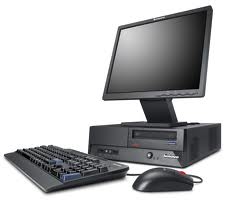
Desktop Model computer
Micro computer is also called personal computer. It was introduced in 1970. It contains  input devices, output device, storage device, memory and processor. It is used by one person at a time. Examples of personal computers are PC and Apple Macintosh. The major types of personal computers are desktop computer and portable computer.
Desktop Computers
These computers can easily fit on a table or desktop, hence the name. These computers come in two models or casings. In Desktop model, the system unit is placed on the desktop or table. Monitor is placed on the system unit. In Tower model, both monitor and system unit are placed on the table.
note on Classification of Computers tower model
Tower Model computer

Portable Computer
Portable is a personal computer that can be carried from one place to other easily. Notebook computer and handheld computer (smart phone) are examples of portable computers. Notebook computer is also called laptop computer. Laptop computers are very small in size and can be placed easily on lap.
Classification of Computers laptop
Lap top computer or notebook computer

Classification of Computers hand held computer
Hand held computer

Handheld Computers (like smart phone) are also potable. Handheld computer is also known as palmtop computer. It easily fits in the hand of the user.
Uses of Micro Computer
The PC is the most common type of computer used in the office. It is now widely used in many homes. These are also used for business and engineering application.
2. Mini Computers
Mini computers were introduced in the 1960s. Mini computer is larger and more powerful  computer than personal computer. It can execute five million instructions per second. It  generally consists of two or more processors.

Picture for a note on classification of computers (Mini computers)


note on Classification of Computers mini computer

Mini computer can serve up to 4000 connected users simultaneously. It is normally accessed by users via personal computer or terminal. A device with a monitor and keyboard is called terminal. It is also known as dumb terminal. It has no processing power and cannot work as stand-alone computer. Examples of mini computers are:
•     VAX-8800
•     AS 400.

Uses of Mini Computers
Mini computers are often used by small and medium-sized companies to provide centralized store of information.
3. Mainframe Computers
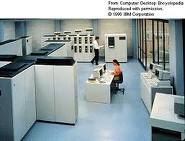
Mainframe computers were introduced in 1975. A mainframe computer is a very large computer in size. It is more powerful than mini computer. It consists of multiple processors. It is designed to perform multiple tasks for multiple users at the same time. Mainframe computers can serve up to 50,000 users at the same time.

Picture for a note on classification of computers (Main Frame computers)


Classification of Computers main frame computer

The users access a mainframe computer through terminal or personal computer. A typical mainframe computer can execute 16 million instructions per second. Examples of mainframe computers are
•     NEC 610
•     DEC 10
Uses of Mainframe Computers
Mainframe computers are used in large organizations. For example, airlines use these computers for ticket reservation system. NADRA - The Computerized National Idenity Card Issuer in Pakistan - uses mainframe computers to maintain the information of population.
4. Super Computers
Super computers were introduced in 1980s. Super computer is the fastest computer. Super computer is the biggest in size and the most expensive in price than any other computers.

Picture for a note on classification of computers (Super computers)

Classification of Computers super computer
It is the most sophisticated, complex and advanced computer. It has a very large storage capacity. It can process trillions of instructions in one second. Super Computer is the fastest and most powerful computer of a time. Supercomputers are very
expensive. Supercomputers are used for highly calculation-intensive tasks. Super computers are used for specialized applications that require immense amounts of mathematical calculations. Supercomputers were designed primarily by computer scientist - Seymour Cray at Control Data Corporation (CDC).
Uses of Super Compters include:
1. Weather forecasting,
2. animated graphics like in Hollywood movies,
3. fluid dynamic calculations,
4. nuclear energy research,
5. space science
6. Weapon and missile design
7. and petroleum exploration etc.
Today, supercomputers are produced by traditional companies such as Cray, IBM and Hewlett- Packard, who had purchased many of the 1980s companies to gain their experience. Since October 2010, the Tianhe-1A supercomputer has been the fastest in the world; it is located in China.
The main difference between a supercomputer and a mainframe is that a supercomputer channels all its power into executing a single program as fast as possible, whereas a mainframe uses its power to execute many programs concurrently. The modern super computer consists of thousands of microprocessors. Super computer uses high-speed facilities such as satellite for online processing.
Examples of super computers are CRAY-XP, ETA-10, and Deep Blue and above all Todays number one super computer is Tianhe-1A supercomputer of China. Aircraft companies use super computer to simulate aircraft and check its performance. Many  Hollywood movies use it for animation purposes.

After studying  a note on classification of computers


Further Suggested Reading:

Thursday, February 17, 2011

What are the basic units or components of a computer

Following are the main basic units or components of the computer:

1. Input Unit

2. Output Unit

3. Central Processing Unit( CPU / Processor)

4. Memory Unit

5. Storage Unit


Diagram Showing Main Components or Basic Units of a Computer

Different Basic Units or fundamental components of a computer


Brief Description of Basic components of Computer

1. Input Unit

Input unit consists of input devices. Input devices are used to enter data and instructions into computer memory. Examples of input devices are Keyboard, mouse, joystick and microphone etc.

2. Output Unit

Output unit consists of output devices. Output devices are used to show results produced by computer after data processing. Examples of output devices are Monitor, Printer, plotter and  speaker etc.


3. Central Processing Unit


Central processing unit is also called CPU or Processor. It is the brain of the computer. It performs data processing. It controls overall operations and components of the computer.

4. Memory Unit


Memory unit consists of memory devices to store data . For Example RAM is most common example of memory.

5. Storage Unit


Storage unit consists of storage media. Storage media are used to store large amounts of data permanently. Examples of storage media are Hard disk, CD, DVD and Zip disk etc.

Further Suggested Reading:

Friday, February 11, 2011

What are Different Types of Computer

Computers can be divided into the following 3 types on the basis of their working mechanism:

1) Analog Computers

2) Digital Computers

3) Hybrid Computers

1. Analog Computers

Analog computer is used to measure continuous values. It measures a physical property like voltage, pressure, speed, time and temperature. An analog computer takes input in analog form and gives output in analog form.
Its output is usually displayed on a meter or scale. Analog computer has low memory and fewer functions. Analog computer is mainly used in the field of engineering and medicine. Examples include:

Examples of Analog Computers include:


analog computer examples thermo meter

examples of analog computer speedo meter
 1. Thermometer
2. Speedometer
3. Analog clock

2. Digital Computers

A digital computer works with digital data. Digital computer uses binary number system. Binary number system consists of only two digits 0 and 1. A digital computer represents data in digital signals. A 0 represents OFF and a 1 represents ON. Digital computer performs arithmetic and logical operations on data. It gives output in digital form.
Digital computers are very fast. These computers can store results. They have large Memory(that is data storing capacity). Today most of the computers used in offices and homes are Digital computers.
Examples:

examples of digital computer personal computer

1. Personal Computer-(also called PC or Micro Computer)
2. Digital Score board
3. Digital watch

3. Hybrid Computers

A hybrid computer is a combination of both analog and digital computer. Hybrid ccomputer can handle both analog and digital data. A hybrid computer combines the best characteristics of both the analog and digital computer. It can accept data in both analog and digital form.
Examples:

1. Hybrid computer devices are used in hospitals that may calculate patient's heart function, temperature and blood pressure etc. This calculation may be converted into numbers and shown in digital form. For example,


The Vital Signs Monitoring unit

also called VSM in short. It has Blood Pressure monitor, ECG monitor, respiratory monitor, and is also used for monitoring anesthesia.
2. Hybrid computers are also used in spaceships and missile system.
3. Hybrid Computer Machines are generally used in scientific applications
4. Hybrid computers are used for controlling industrial processes.
Next Read Differences between Analog and Digital Computer 

Further Suggested Reading:

Thursday, February 10, 2011

What are Charachteristics of Computer

Following are the important characteristics of a computer:

1. Speed

Computers work at a very high speed. They are much faster than humans.
A computer can perform billions of calculations in a second. Computer speed is measured in Mega Hertz (MHz).

2. Storage

A computer can store large amounts of data permanently.

3. Processing

A computer can process the given instructions for processing of data. It can perform different types of processing like addition, subtraction, multiplication and division.

4. Accuracy

Accuracy means the capability to provide results without any errors. Computer can process large amounts of data and produce 100% accurate results.

5. Recalling

A computer can recall the stored data and information at any time, as and when required.

6. Cost Reduction

Computer can reduce cost. We can do a work in less time and cost by computer. A single person, with computer, can do work of many people in an office.

8. Versatile

A computer can perform different types of tasks. We can use a computer in educational institute, in hospital, bank or at home. computers are being used in banks industry, medical, science and engineering fields.

9. No Feelings

Computer has no feelings. It cannot be affected by sorrows and happiness.

10. No Intelligence

Computer itself is not intelligent. It only follows the given instructions. If a computer is given a program for addition it cannot perform subtraction by itself.

Further Suggested Reading:

Find Your Correct Age From Date of Birth

First of all click on First two digits to type Month number from keyboard like any number from 1 to 12. . Now click on next two digits and t...