Wednesday, August 3, 2011

What is ROM Explain Different Types of ROM

Topic: What is ROM Explain Different Types of ROM

ROM


ROM stands for Read Only Memory, because its contents can be read and used only and we cannot change or delete its contents. It is a non volatile memory. Its retains its contents even after switching off the computer. Therefore, ROM does not require electricity to retain its contents. ROM is a permanent memory. The instructions in ROM are written at the time of manufacturing by the manufacturer.  

Importance of ROM in Computer System


1. One important reason a computer needs ROM is that instructions stored in ROM (called ROM BIOS - Basic Input/Output System)execute on start-up of computer and guide the computer what to do. They make the computer ready for work.
2. ROM contains a set of start-up instructions to check that memory is functioning well and check for other hardware devices.
3. These instructions also check for an operating system and load its necessary part into RAM, so that a user interface for example "Windows Desktop" is displayed on computer screen. Now computer is ready to work with. A user now can easily perform work on computer.

Where ROM Chip is installed in Computer?


ROM chip is fixed on motherboard as shown in the figure: AMIBIOS -American Megatrends ROM chip.
Where ROM Chip is installed in Computer?
Another picture of Rom


Types of ROM


Following are the types of ROM

  • PROM

PROM stands for Programmable Read Only Memory. Instructions can be stored in PROM only once. Then it becomes ROM and we cannot change instructions in it. Initially PROM is a blank chip. Once instructions are written on it, then it become ROM. Now we cannot change or delete the instructions. If there is any error in writing instructions then PROM chip becomes unusable.
  • EPROM

EPROM stands for Erasable Programmable Read Only Memory. Program instructions written on EPROM can be erased and changed with the help of ultra violet rays. So if once we write instruction on this chip with errors, we can erase wrong instructions and rewrite new instructions.
  • EEPROM

EPROM stands for Electrically Erasable Programmable Read Only Memory. Program instructions written on EEPROM can be erased with the help of electricity and rewritten.

What is RAM, Explain Different Types of RAM

Today we are going to discuss Different Types of RAM, that is, Random Access Memory.


RAM    /    What does RAM mean


Ram stands for Random Access Memory. Data in RAM can be accessed directly. That is, we can access data directly from any location of RAM in the same time. This Random Access quality makes RAM a very fast memory. RAM is volatile. Data and programs in RAM are erased when computer is turned off.

What does RAM do

Therefore RAM is a temporary memory. It is used to store those data and programs, which are currently being executed by CPU. Ram is also called Primary Memory or Main Memory.

Where RAM memory chip is installed?


RAM chip is installed into one of the memory slots on motherboard, as shown in the figure:
What is RAM? Explain Different Types of RAM

What does RAM mean


Importance of RAM.


1.  A Program must be laoded in RAM for execution.
The programs and data currently being executed are in computer's main memory, that is, in RAM. The programs and data needed by these programs is loaded into RAM and run from this memory for FAST ACCESS. Because hard disk is very slow device, every program we run, is loaded into RAM from hard disk first, and then it is executed by processor. CPU is very fast device, it can take instructions and data to execute from RAM much faster than from a hard disk. 


2. RAM is an  Important Factor in increasing Speed of Computer

One of the most important factors affecting the speed and power of a computer is the AMOUNT OF RAM it has. Normally, the more RAM a computer has, the more speed and power of working it has.In fact,  if a computer with a very fast processor has inadequate amount of RAM, it may still run slowly, especially when running multiple programs.
what are the types of  RAM
Discuss Different Types of RAM Random Access Memory/ what are the types of  RAM

Types of Ram

What are the types of  Ram


There are two main types of Ram.

  • Dynamic Ram (DRAM)

Dynamic Ram is widely used in personal computers. It is a cheaper kind of RAM. DRAM stores data in the form of an electric charge. DRAM loses electric charge with the passage of time, so DRAM needs to be refreshed frequently. Otherwise, it may lose data. Dram is recharged many times in a second. Therefore, it is slower than SRAM. Since CPU cannot access the data from DRAM while it is in the process of refreshing or recharging.

  • Static Ram (SRAM)

Static Ram does not need to be refreshed again and again. So processor can access data from static RAM faster than DRAM. There is no time wastage in refreshing the memory again and again. Static RAM is more expensive and faster than DRAM. Static Ram is used to build a very fast memory called CACHE (pronounces 'cash' ) memory.

Monday, August 1, 2011

What are Dual Devices or Both Input/ Output Devices

The devices that can be used to perform both functions -input and output- are called Dual Devices. These devices are also called Dual Purpose Devices or Both Input/Output Devices. With the help of a dual purpose device, we can enter data into computer as well as we can output data from the computer to outside world.  For example, Dual devices include:  Touch Screen Monitor, Modem, Network Interface Card, Sound card, Hard disk drive, Floppy disk Drive, Magnetic Tape Drive CD-Writer and DVD-Writer etc. These are also called Input/output devices, because they perform both functions.
  • Touch Screen Monitor
Dual Devices or Both Input / Output Devices - Touch screens
Touch Screen Monitor is an input/output device. It uses a special touch sensitive screen. The User can enter data by touching icons or menus on the screen. As soon as the user selects a command from menu, output is displayed on screen. Commonly touch screen monitors use sensors to detect touch of finger.

  •      Headset

A headset may be considered as both Input / Output device, because it has a microphone for voice input and small speaker phones for  sound output.

Examples of Dual Devices or Both Input / Output Devices - headsets
Example of Both Input / Output Devices - headsets

Headsets are used for video conferences and video calls through SKYPE and other such free software to make video calls.
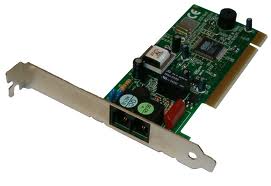
  • Modem
Modem is example of Dual device
Internal modem

External modem

Modem stands for Modulator / Demodulator. Modem is a communication device.  It makes possible receiving data from internet into our computer (input) and sending data from our computer to another computer on internet(output).  It performs two functions: Modulation (converting digital signal into analog signal) and Demodulation(converting analog signal to digital signal). It makes possible receiving data from internet into our computer (input) and sending data from our computer to another computer on internet(output). Modem sends and receives data from one computer to another through telephone lines. It links your personal computer to the Internet through your ISP (Internet Service Provider). A telephone line supports only analog signals, whereas computer accepts only digital signals. So when a computer wants to send data to another computer, digital data is converted into analog data before placing on telephone line. The process of converting digital signal into analog signal is called Modulation. Similarly, on the receiving computer, modem converts analog data (from telephone line) into digital data, before it is entered into receiving computer. The process of converting analog signal into digital signal is called Demodulation.
  • NIC - Network Interface Card
NIC is Example of Dual devices
NIC or LAN card - NIC is Example of Dual devices

NIC stands for Network Interface Card. It is used to link network computers for transmitting data. With the help of NIC our computer can receive  data, instructions and information from another computer (input). NIC will also be helpful to send data from our computer to another computer on the network (output). NIC is also called a LAN card, local area network card or LAN adapter.

  • Sound Card
Sound card is Example of Dual devices
Sound card or audio card

A sound card is a computer component that facilitates the input and output of audio signals to and from a computer. A speaker produces audio output with the help of sound card. In addition we use microphone to input our voice into computer with the help of sound card. 
  •     Hard disk Drive
Dual devices or both input output devices

Hard disk drive is an input/output device. It has read/write heads to read data from hard disk(input) and to write data to hard disk(output).
  • Floppy disk Drive
Dual devices or both input output devices

Floppy disk drive is an input/output device. It has read/write heads to read data from floppy disk(input) and to write data to floppy disk(output).   
  • Magnetic Tape Drive
Dual devices or both input output devices

Magnetic Tape drive is an input/output device. It has read/write heads to read data from magnetic tape(input) and to write data to magnetic tape(output).
  • CD-Writer / CD-Recorder
Dual devices or both input output devices
CD-Writer is an input/output device. It is used to store data on CD. It is used to read data from CD(input) and to write data to CD(output).
  • DVD-Writer / DVD-Recorder
Dual devices or both input output devices

DVD-Writer is an input/output device. It is used to store data on DVD. It is used to read data from DVD(input) and to write data to DVD(output).

Find Your Correct Age From Date of Birth

First of all click on First two digits to type Month number from keyboard like any number from 1 to 12. . Now click on next two digits and t...