Thursday, July 14, 2011

Uses Of Computer in Medical Field

Today Computers are an essential part of an hospital. Doctors and administration staff uses computers to manage patient history and medicine stocks etc. Computers play a key role in the medical field.  Their uses include storing patient related data, housing knowledge bases, providing the logic and circuitry for medical equipment, scanning and imaging the body, and facilitating speedy communications. Computers can be used in medical field in the following ways:
Uses of Computers in Medical Field


Top Seven Uses of Computers in Medical Field 

  •  Hospital Administration

These days, Computers are being used in hospitals extensively. We can computerize the accounting, payroll and stock system of the hospital. We can keep the record of different medicines.

  •  Recording Medical History Of Patients

Computer can be used to store the medical history of the patients. Medical history is very important for patients as well as doctors. Doctors may better prescribe the medicines on the basis of the medicines used in past for a particular patient and the results obtained. Database Management System software is used to store Patient records efficiently.

Patient records and history are stored on computer databases in the medical field.  The medical history of a patient includes physical symptoms, diagnoses, treatments, and even family medical history. 

Details of the medications prescribed are stored together with details of any that can not be prescribed, such as an allergy to penicillin. 

Appointments are scheduled using a computer database. 

Billing information is also stored. 

Hospitals and surgeries depend on computers for administrative and financial functions.
Patient Monitoring systems - Uses of computers in Medical Field

  •  Monitoring Systems

Many computerized devices are used to monitor the blood pressure, heartbeat and brain of the patients. Computers guide in some surgical operations, too. For example in laparoscopic surgery, the surgeon inserts the medical tools and a small camera, and conducts the operation with the help of computers and monitors. 

Computers also monitor heart rates, pulse rates and brain readings. Therefore, we conclude that computers make this possible to deal with such complicated operations. It would be virtually impossible for a human to do this.

  •  Diagnosis of Diseases

Computers are being used to diagnose diseases with the help of software. There are some Medical Software to diagnose diseases and prescribe medicine on the basis of symptoms.

  • Life Support system

Life support systems are used to help disabled persons, for example hearing aid device for deaf people. Latest life support devices use computer technology to help the disable people, to overcome their disabilities.

  •   Faster and Cheaper Communications

Doctors and other staff can use internet to communicate to doctors in other parts of the world, for sharing information on medical topics or even about a particular patient case. They can exchange pictures, reports and other documents, too.

  •  Clinical Image Processing

Computers are being used in Medical Radiology / Diagnostic Imaging. Computers play an role in all types of clinical image processing like CT scan and ultrasound. Ultrasound uses sound waves that bounce off body parts, producing echoes. A computer translates the echoes into images, showing broken bones, muscle problems, or changes in organs, accurately.

Further Suggested Reading:

Thursday, July 7, 2011

Uses Of Computer In Education Field

Computer can be used in education in the following ways:
  •  Computers In Teaching and Learning Process ( Computer Aided Learning - CAL )

Computers are being used actively in educational institutes to improve the learning process. Teachers can use audio video aids through computer to prepare lesson plans. They can use Microsoft Power Point to prepare electronic presentations about their lectures. These electronic presentations will be displayed on multimedia projectors in class rooms. This will be interesting and easy to learn for students. Multimedia presentations are easy to deliver for teachers too, These presentations save a lot of effort and time. Moreover multimedia presentations are interesting to view and hear sound and visual  effects. Computers will be helpful for:
                    

  1.   Instructing the students using PowerPoint slides, Word documents or Web pages and using hyperlinks for better concept clarity.
     2.  Helps in improving pronunciation of students by using microphones, headphones, speakers, specially prepared software and special dedicated websites.

     3. Encouraging the students to use internet, surf web pages and gather relevant detailed information  through search engines. Students will gain a lot of information and knowledge by positive use of internet.


  •  CBT (Computer-Based Training)

CBT stands for Computer Based Training. In CBT, we prepare different educational programs with the help of professional teachers and audio visual aids. These educational programs are generally in the shape of lectures on a specific subject. These programs are provided on CDs. Students will learn as and when they wish and at their own homes. They can view CD contents, view lecture notes, books or video lectures about their course work any time they need.
 
  •  Online Education   

Many web sites provide online education. You can read or download educational material and books. For example, Virtual University of Pakistan is an Online Educational Institution. Students use internet to access VU website. The students log in to their accounts and e-mail boxes. They interact with different teachers online. They receive and submit their assignments and work through internet to their teachers. Email systems or online chat systems are used for instant communication between students and teachers.
  •  Research

Computers are also used for research work. Internet is a huge source of information on any topic. Students of any level can use internet to access useful information about their projects and research work. Moreover different researchers can share their research work with other researchers using computers and Internet. Researchers use computers to organize and store their research materials in computers.
  • Distance Learning

In Distance Learning, the students do not need to come to institutes daily.  The Distance Learning institue will provide the students with study materials and the students attend the virtual class room. The teachers provide video lectures to their students. The students may ask questions to their teachers using network communications and e-mail etc.
  • Institute Administration

Computers are being used to perform many tasks in educational institutions, easily and quickly:
          o Keeping Records of students (admission records, attendance and leave records, fee       collection,    examination records of students)
          o Storing Records of employees( payroll, attendance, assignments, project) of school / college
          o Managing Accounts of the institution
          o Fees collection and maintenance of fees record.
          o Circulation of instruction/notices and getting it in printed form
          o Preparation of school/ college magazine, etc. with the help of Microsoft Word, a popular word processing software.

Advantages of Using Computers in Education Field

Uses and Advantages of Computers in Education Field


  •  Faster data processing, speed is the main characteristics of a computer.
  •  Huge and organized Storage of information, Vast storage is another main characteristic of a computer. Students and teachers can download and store large amounts of educational materials, books, presentations, lecture notes, question papers in computers.
  •  Computers can ensure Accuracy of teaching text materials, as many word processing application software provide Spelling and Grammar Checking Tools
  •  Audio-visual aids in teaching process for effective learning
  •  Attractive and Better presentation of information through applications software like Microsoft Power Point to develop brilliant presentations for lectures
  •  One of the main uses of computers in education is 'the Access to the Internet' for information search about any topic.
  •  Another advantage of using computers in education field is Quicker communication between students, teachers and parents that improves quality of teaching and learning process. Parents can know the progress of their children through computers and internet, by browsing the website of the educational institute. They can check different examination results, attendance reports, curricular and co-curricular activities of their children. 

Negative Impacts of Computer on Student's Education

Harmful Contents

Students must use computers and internet under parental control. If not supervised by parents or teachers, they may be exposed to harmful content from the Internet.

Wastage of Time

They may wste their time by using computers for:

playing video games,
playing online multi user games
watching movies
using Facebook, Twitter and other social media websites
internet surfing
chatting

 Hacking 

At worst, some hackers can easily hack computers especially  if someone accesses malicious content.

 Impacts on Physical and Mental Health

In addition, excessive use of  computers and internet can seriously affect their physical and mental health.

Laziness

It increases the laziness of a person.

Affecting Ability of Thinking and Creativity

Since  a student or any individual can search everything so easily on internet through search engines like google; thiis may destroy the power of creativity skills and the ability to think.

Overuse of Social Media Websites

Students may waste a lot of time by creating accounts on social media websites like Facebook, Twitter and Instagram etc.

Cyberbulling

Moreover they may become a victom of cyberbullying by providing personal information on their profiles of social media websites.


Further Suggested Reading:

Tuesday, July 5, 2011

Explain Different Uses Of Computer in Business Organizations

Now-a-days, computers are the essential part of any business organization. Computers are used in business companies for performing different tasks like Record Maintaining, Stock management, Pay Roll Systems, Business Correspondence and Business Communication etc,  Computer can be used in business in the following ways:
Explain Different Uses of Computers in Business Organizations


  • Employee Record Keeping

All business organizations keep record of their employees. Computers are being used extensively to make this task easier and more efficient. For example, computers are being used to keep records of :


Uses of computers in business, computer benefits in business
Uses of computers in business

  1. Daily attendance of employees
  2. Recording overtime hours of employees
  3. Recording Total hours worked of all employees
  4. Calculating Pay of employees
  5. Printing pay bills and receipts every month
  •   Marketing   

Any business organization can use computers for marketing their products.

  • Stock Exchange

Many stock exchanges are using computers for conducting bids. Stock brokers are using computers to perform all business functions in stock exchange.
Uses of Computers in Business - Stock Exchange

  • Banks: Uses of Computer in Business

These days, banks are incomplete without computers. Banks are using computers to record Daily Customer Transactions. Every bank is using a customized software like Accounts Maintenance System. Accounts Maintenance System manages all customer financial dealing records through bank. The use of computers in banks has provided many benefits. It saves a lot of time and provides convenience for the customer.
  • Email

E-Mail stands for Electronic Mail. By E-Mail, you can send and receive messages. You can also attach files of different types with email message. No doubt, E-Mail is a faster and cheaper way of communication.
  • Payroll system

Computerized pay roll system is used in different organizations to maintain pay accounts of employees, easily and quickly.
  • Stock system: Uses of computer in Business

Computerized stock system is used to record number of items in stock of any organization efficiently.

  •    Fax

Computers can be used to send and receive faxes. Different Fax Software are available in market for this purpose that will work together with Fax Modem to send and receive faxes thorough computers.
  • Documentation

Word processor software like MS Word is used to prepare different types of documents like letters, applications and other documents.
  • Graphics: Uses of Computer in Business

Graphics software like Adobe Photoshop or Corel Draw are used for image editing and preparing posters and cards etc.

Uses of computers in business
  • Microsoft Power Point Presentations

Power point can be used to prepare good looking computerized presentations for business.

  • Spreadsheet: Uses of Computer in Business

Spreadsheet software like Excel can be used to prepare computerized worksheets and charts. Microsoft Excel can be used by small shop keepers or small businesses for fast calculations on data. Microsoft Excel provides many built-in functions for different types of calculations in business organizations.
  • Accounts department

Accounts department is one of the many departments that use computers for handling business transactions in any organization, especially financial transactions. Accounts department can use Accounting software like LedgerSMB, BizCorei and Microsoft Excel to prepare different accounting documents like balance sheet, Trial balance, Ledger and bank reconciliation etc.

Further Suggested Reading:

Thursday, June 30, 2011

Explain The Concept of A Computer System

A system is a set of inter related components that work together to fulfill a purpose. For example a Road Transportation System will consist of the parts - roads, vehicles- trucks, buses, vans, cars etc, passengers, the staff for ticketing and maintenance of vehicles and roads etc. And the transportation system will fulfill the purpose of carrying of passengers and luggage from place to place. Similarly, a computer system consists of many components that work together to fulfill the purpose of data processing. A Computer system consists of the following four parts:

1.    Hardware
2.    Software
3.    Data
4.    User


1.    Hardware
The mechanical devices that makeup the computer are called HARDWARE, for example, Keyboard, hard disk, monitor, processor and mother board etc. Hardware are physical devices. They can be touched. Hardware device are interconnected and perform input, processing and output operations.

2.    Software
Software is the set of instructions given to computer to perform a task. Software tells the computer what to do. System Software like operating systems are used to manage components and operations of computer. Application Software like MS Word and MS Excel are used to solve specific problems of the user, for example creating documents or preparing Student Result Sheet etc. Thousands of different software are available for use on PC.
3.    Data
Data is the collection of raw facts. Data processing is the primary job of a computer. Computer processes data in many ways to convert them into useful information. Processed data becomes information. For example, during census, data of all citizens is collected. Census data is used to get report/information about total population of a country and literacy rate etc.
4.    Users
People that operate the computer are called computer operators or computer users. Users use computer to solve different problems. For example, in a college a computer operator in Examination Section will feed marks obtained by students in a software like MS Excel. He/ She will perform certain functions and formulae to calculate percentage and grade of each student and prepare a result sheet. This result sheet will show the marks obtained, percentage, grade and Fail/ Pass status of every student.
Further Suggested Reading:

Friday, June 17, 2011

What are uses of computer at Home

Uses of Computer
Today, computer is used in almost every field of life. The use of computer has made different tasks very easy for us. Computer can be used at home in the many different ways.
Explain different uses of computers at Home

Computer has made a very vital impact on our society. People are using computers for performing different tasks quickly and easily. In fact, computer has made our life more comfortable.
 Uses of Computer at Home
Computer can be used at home in the following ways:

1.  Home Budget

Computer can be used to manage the home budget.
What are the Uses of computer at home

You can easily calculate your expenses and income with the help of a software like Microsoft Excel. In MS Excel you can prepare a simple worksheet to calculate your daily expenses and income.
Top uses of computer at home

2. Computer Games

An important use of computer at home is playing games. Different types of games are available. And if you have internet connection, then you can play games online, too. You can download PC games free from many websites. Computer games are especially played by school going children.

3.   Entertainment

You can watch movies, hear songs and find information on Internet. Video and audio songs, movies, TV shows or dramas are some of the entertainment media that can be accessed by internet enabled computer.

4.   Information

You can find any type of information from Internet. You can download books to improve your knowledge. You can use search engine, specially the giant Google Search Engine, to find information you want. Internet is a huge database of knowledge on every topic.

5.   E-Mail

You can send and receive messages and information by E-Mail. You can

6.  Chatting / Instant Messaging

You can chat with your friends on Internet by instant messaging. You can also talk with them.

7. Searching For Jobs

You can search jobs sitting at home and browsing internet on your computer. There are many job searching websites. Most of these websites provide daily Email in your inbox with the jobs postings of your interest.

8. Online Shopping

With the help of your computer and internet, you can buy any thing online and pay by credit cards.

9. Online Banking

E-Banking or online banking is the great facility for maintaining your financial transactions online.  Moreover, you can pay your utility bills from your account while sitting at home.

10. Starting Home Based Business

You can use computer with internet to start and run a home based business or you can use computers for online jobs staying at home.
Write down uses of computer at home


Further Suggested Reading:

What are the basic operations of a computer

There are five basic operations of a computer as follows:

1. Inputting

It is the process of entering data and instructions into computer system. Input is performed by input devices like keyboard, mouse, scanner, digital camera and microphone etc.

2. Storing

It is the process of saving data and instructions to make them available as and when required in future. Data and programs are stored on permanent storage devices, especially on hard disk. Other permanent storage media include CD - Compact Disk, DVD - Digital Video Disk and Zip Disk etc.

3. Processing

It is the process of performing arithmetic and logical operations on data to convert them into useful information. Processing is performed by CPU- Central Processing Unit. CPU is also called Processor. It is the brain of computer.

4. Outputting

It is the process of producing useful information after processing data, for example, printed reports for user. Output is presented by output devices like monitor, printer and speakers.

5. Controlling

It is the process of directing and controlling the manner and sequence in which all above operations are performed. Control Unit will control operations and components of a computer. Control Unit is a part of the processor.

Further Suggested Reading:

Saturday, May 14, 2011

Write a note on Classification of Computers

Q. Write a note on Classification of Computers   OR Explain Types of computer on the
basis of Size, Shape and Resources. OR How digital computers are classified?

Classification of Computers
Computers are classified on the basis of size, speed and price as under:
•    Microcomputer or Personal Computer
•    Mini Computer
•    Mainframe Computer
•    Super Computer

1. Micro Computers
Write a note on Classification of Computers
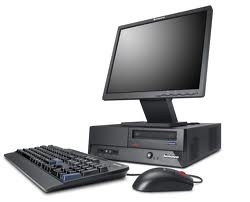
Desktop Model computer
Micro computer is also called personal computer. It was introduced in 1970. It contains  input devices, output device, storage device, memory and processor. It is used by one person at a time. Examples of personal computers are PC and Apple Macintosh. The major types of personal computers are desktop computer and portable computer.
Desktop Computers
These computers can easily fit on a table or desktop, hence the name. These computers come in two models or casings. In Desktop model, the system unit is placed on the desktop or table. Monitor is placed on the system unit. In Tower model, both monitor and system unit are placed on the table.
note on Classification of Computers tower model
Tower Model computer

Portable Computer
Portable is a personal computer that can be carried from one place to other easily. Notebook computer and handheld computer (smart phone) are examples of portable computers. Notebook computer is also called laptop computer. Laptop computers are very small in size and can be placed easily on lap.
Classification of Computers laptop
Lap top computer or notebook computer

Classification of Computers hand held computer
Hand held computer

Handheld Computers (like smart phone) are also potable. Handheld computer is also known as palmtop computer. It easily fits in the hand of the user.
Uses of Micro Computer
The PC is the most common type of computer used in the office. It is now widely used in many homes. These are also used for business and engineering application.
2. Mini Computers
Mini computers were introduced in the 1960s. Mini computer is larger and more powerful  computer than personal computer. It can execute five million instructions per second. It  generally consists of two or more processors.

Picture for a note on classification of computers (Mini computers)


note on Classification of Computers mini computer

Mini computer can serve up to 4000 connected users simultaneously. It is normally accessed by users via personal computer or terminal. A device with a monitor and keyboard is called terminal. It is also known as dumb terminal. It has no processing power and cannot work as stand-alone computer. Examples of mini computers are:
•     VAX-8800
•     AS 400.

Uses of Mini Computers
Mini computers are often used by small and medium-sized companies to provide centralized store of information.
3. Mainframe Computers
Mainframe computers were introduced in 1975. A mainframe computer is a very large computer in size. It is more powerful than mini computer. It consists of multiple processors. It is designed to perform multiple tasks for multiple users at the same time. Mainframe computers can serve up to 50,000 users at the same time.

Picture for a note on classification of computers (Main Frame computers)


Classification of Computers main frame computer

The users access a mainframe computer through terminal or personal computer. A typical mainframe computer can execute 16 million instructions per second. Examples of mainframe computers are
•     NEC 610
•     DEC 10
Uses of Mainframe Computers
Mainframe computers are used in large organizations. For example, airlines use these computers for ticket reservation system. NADRA - The Computerized National Idenity Card Issuer in Pakistan - uses mainframe computers to maintain the information of population.
4. Super Computers
Super computers were introduced in 1980s. Super computer is the fastest computer. Super computer is the biggest in size and the most expensive in price than any other computers.

Picture for a note on classification of computers (Super computers)

Classification of Computers super computer
It is the most sophisticated, complex and advanced computer. It has a very large storage capacity. It can process trillions of instructions in one second. Super Computer is the fastest and most powerful computer of a time. Supercomputers are very
expensive. Supercomputers are used for highly calculation-intensive tasks. Super computers are used for specialized applications that require immense amounts of mathematical calculations. Supercomputers were designed primarily by computer scientist - Seymour Cray at Control Data Corporation (CDC).
Uses of Super Compters include:
1. Weather forecasting,
2. animated graphics like in Hollywood movies,
3. fluid dynamic calculations,
4. nuclear energy research,
5. space science
6. Weapon and missile design
7. and petroleum exploration etc.
Today, supercomputers are produced by traditional companies such as Cray, IBM and Hewlett- Packard, who had purchased many of the 1980s companies to gain their experience. Since October 2010, the Tianhe-1A supercomputer has been the fastest in the world; it is located in China.
The main difference between a supercomputer and a mainframe is that a supercomputer channels all its power into executing a single program as fast as possible, whereas a mainframe uses its power to execute many programs concurrently. The modern super computer consists of thousands of microprocessors. Super computer uses high-speed facilities such as satellite for online processing.
Examples of super computers are CRAY-XP, ETA-10, and Deep Blue and above all Todays number one super computer is Tianhe-1A supercomputer of China. Aircraft companies use super computer to simulate aircraft and check its performance. Many  Hollywood movies use it for animation purposes.

After studying  a note on classification of computers


Further Suggested Reading:

Find Your Correct Age From Date of Birth

First of all click on First two digits to type Month number from keyboard like any number from 1 to 12. . Now click on next two digits and t...