C Plus Plus Programming Practical ACS Advanced Computer Studies

C Plus Plus Programming Practical Advanced Computer Studies

Here is a sample old question paper for guiding the students about the practical examination.


C++ Programming Practical will be of  20 marks.
Time allowed will be 1 hour 30 Minutes.
Section One contains only one compulsory question of Viva Vice ( Oral questioning)
Question No: 1 will be compulsory , VIVA VOCE of 5 marks.

In Section -II , You have to attempt any two questions(programs) out of  3 questions
Question No 2: C++ Program of 7.5 Marks
Question No 3: C++ Program of 7.5 Marks
Question No 4: C++ Program of 7.5 Marks
Sample Old Question Paper C++ Programming Practical for Advanced Computer Studies
C++ Programming Practical for Advanced Computer Studies

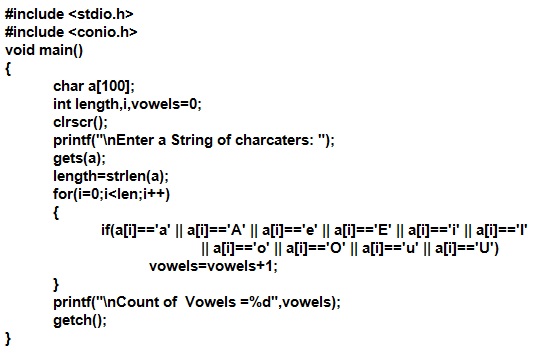
A sample solution to program 1:

Count number of vowels in a string  c program
Count number of vowels in a string  c program


Count number of vowels in a string output of c program

Comments

Popular posts from this blog

Types Of Headings In HTML

HTML Hedings Headings in HTML are used to display Titles, Sub-Titles of Sub-Sub-Titles for your web page text. There are six types of headings in HTML. H1 is the largest heading and H6 is the smallest heading. <H1> is opening tag whereas </H1> is the closing tag for the largest heading. The text between <h1> and </h1> will be displayed as the main Title in your web page. Following are the six tags used for six types of headings in HTML. <H1> ... </H1> <H2> ... </H2> <H3> ... </H3> <H4> ... </H4> <H5> ... </H5> <H6> ... </H6> The H1 heading is used for main titles. Actually H1 heading will show the text in largest font size. H2 headings is used for Sub-Titles. H2 displays text in smaller font size than H1, H3 displays text of font size smaller than H1 and H2, and so on. H1 is for largest heading in a text page and H6 is for smallest heading.   Importance Of Headings in SEO H...

Explain different types of storage devices

Topic: Explain different types of storage devices in Computer systems Storage Devices Storage devices are used to store data and instructions permanently. Storage devices are also called secondary storage devices / backing storage devices / external storage devices or auxiliary storage devices. Examples of storage devices include Hard Disk, CD and DVD etc. Why Secondary Storage Devices are Used? Secondary storage devices are used because: Primary memory(RAM) is volatile and temporary. When computer is switched off, all data in ram is erased. Storage devices can store large amounts of data and instructions permanently whereas Primary memory has less capacity of storing data. Types Of Storage Devices There are three main types of storage devices:  Magnetic Tape   Magnetic Disk   Optical Disk   Flash Memory storage devices 1. Magnetic Tape Magnetic tape is the oldest storage device. It is made of plastic coated with m...

Create Bar Chart in Excel Easily by Example

Today, we will discuss How to Create Bar Chart in Excel Easily by Example . A chart is the graphical representation of data. Microsoft Excel provide an easy to use Chart Wizard for this purpose. The Microsoft Excel Chart Wizard guides you on each step to perform the specific tasks and get a brilliant Chart finally. Create Bar Chart in Excel Easily by Example Steps to Create Bar Chart in Excel Easily by Example NOTE: You can chose a chart Type as BAR chart which is on number two in chart type list. For this example, here pictures are provided for the default chart type, the first one, named COLUMN CHART.  as shown in the following picture.   Create Worksheet and enter data to Create Bar Chart in Excel Easily by Example. Select the columns data. If the two columns are adjacent, Select the both columns along with column headings with the help of mouse. If the two columns are not adjacent, select first column by mouse dragging. Now press and hold CTRL button...