Friday, January 20, 2012

Use Of Colspan and Rowspan in Tables HTML

Colspan and Rowspan are two important attributes of TD and TH tags used in HTML tables.

Colspan


Colspan is an attribute of TD or TH tags used to make data cells and header cells in an HTML table. We can use Colspan to expand / span a cell on many columns. For example, in the following table, the first header cell spans two columns, so here we use <th colspan="2">Marks</th> to get the required result in the displayed html table.

Marks
MathsComputer
10087
The complete HTML coding is as follows:

<table border="1">
<tr> <th colspan="2">Marks</th> </tr>
<tr> <th>Maths</th><th>Computer</th></tr>
<tr> <td>100</td><td>87</td> </tr>
</table>

Rowspan

Rowspan attribute is used to expand or span a cell to multiple rows. For example, in the following table example, the first TH cell (Marks) spans on two rows. We use <th rowspan="2">Marks</th> for this purpose.


Marks
MathsComputer
10087

The complete HTML coding of the table is as follows:
<table border="1">
<tr> <th rowspan="2">Marks</th>
<th>Maths</th><th>Computer</th></tr>
<tr><td>100</td><td>87</td></tr>
</table> 

Saturday, January 14, 2012

HTML Table Tag Basics

Tables

Tables are very important to show data in the form of rows and columns. Tables make data more readable and easy to understand. A table consists of rows, columns and cells.

HTML Tags To Make A Table

As we know that there are basically three elements in a table, that is, rows, columns and cells. So, there are the following basic tags to create a table in an HTML web page:
  1. <TABLE> tag
  2. <TR> tag
  3. <TD> tag
  4. <TH> tag


<TABLE> Tag

<Table> tag is used to specify the start of a table. It also specifies some attributes of the table like ALIGN and BORDER attributes etc.
Example 1: <Table>                    => Table without a border.
Example 2: <Table border="1">     => Table with a border of width 1.
Example 3: <Table align="left" border="2">  => A left aligned Table with a border of width 2.

<TR> Tag

TR stands for TABLE ROW. As the name shows, <TR> tag is used to create a row in a table. A row is started by <TR> tag and is closed by </TR> tag. There are one or more <TD> or <TH> tags between <TR> and </TR> tags to create cells.

Example 1: <TR>
                <TD>1</TD>
                <TD>Ahmad</TD>
                </TR>
Output:

1 Ahmad

Example 2:
              <TR bgcolor="red">
              <TD>1</TD>
                <TD>Ahmad</TD>
               </TR>
Output
1 Ahmad


<TD> Tag

<TD> tag is used to create a cell. TD stands for TABLE DATA. In addition, the number of cells in a row will specify number of columns in a table. The data to be shown in a cell is placed between <TD> and </TD> tags.

Example 1: <TD>Ahmad</TD>
Example 2: <TD bgcolor="yellow">345</TD>
Example 3: <TD width="100">Nasir</TD>

<TH> Tag

<TH> tag is used to create a header row in a table. TH stands for TABLE HEADING.One <TH> tag makes one header cell. The data to be shown in header cell is placed between <TH> and </TH> tags.


Example 1: <TH> Roll No </TH>
Example 2: <TH bgcolor="yellow">Name</TH>
Example 3:
<TR>
<TH>Roll Number</TH>
<TH>Name</TH>
<Th Marks</TH>
</TR>
Output:

Roll Number Name Marks

A Complete Table Example Code and Output in Browser

HTML sample CodeOutput in web browser
<table border="4">
<tr>
<th>Roll Number</th>
<th>Name</th>
<th>Marks</th>
</tr>
<tr>
<td>1</td>
<td>Ahmad</td>
<td>700</td>
</tr>
</table>

Roll Number Name Marks
1 Ahmad 700


Saturday, January 7, 2012

Different Types of Text Formatting Tags in HTML

There are many Text formatting tags available in HTML. You can format your text as:
  • Bold Text
  • Italic Text
  • Underline Text
  • Superscript Text
  • Subscript Text


    Let us discuss these formatting tags one by one with example html source code and the output in web browser.

    1. Bold Text

    <b> tag is used for formatting the text as bold text. You place the text within <b> and </b> tags to make it bold.

    2. Italic Text

    <i> tag is used for formatting the text as italic text. You place the text within <i> and </i> tags to make it italic.

    3. Underline Text


    <u> tag is used for formatting the text as underline text. You place the text within <u> and </u> tags to make it underline.

    4. Superscript Text


    <sup> tag is used for formatting the text as superscript text. You place the text within <sup> and </sup> tags to make it superscript.

    5. Subscript Text


    <sub> tag is used for formatting the text as bold text. You place the text within <sub> and </sub> tags to make it subscript.


    HTML Formatting Tags Source Code Examples

    HTML Formatting Tags Output in web browser
    <b>Bold Text</b>
    <i>Italic Text</i>
    <u>Underline Text</u>
    Superscript Example X Squared= X<sup>2</sup>
    Subscript Example X base 2= X<sub>2</sub>

    Bold Text
    Italic Text
    Underline Text
    Superscript Example X Squared= X2
    Superscript Example X base 2= X2

    Sunday, January 1, 2012

    Types Of Headings In HTML

    HTML Hedings

    Headings in HTML are used to display Titles, Sub-Titles of Sub-Sub-Titles for your web page text. There are six types of headings in HTML. H1 is the largest heading and H6 is the smallest heading. <H1> is opening tag whereas </H1> is the closing tag for the largest heading. The text between <h1> and </h1> will be displayed as the main Title in your web page. Following are the six tags used for six types of headings in HTML.

    1. <H1> ... </H1>
    2. <H2> ... </H2>
    3. <H3> ... </H3>
    4. <H4> ... </H4>
    5. <H5> ... </H5>
    6. <H6> ... </H6>


    The H1 heading is used for main titles. Actually H1 heading will show the text in largest font size. H2 headings is used for Sub-Titles. H2 displays text in smaller font size than H1, H3 displays text of font size smaller than H1 and H2, and so on. H1 is for largest heading in a text page and H6 is for smallest heading.  

    Importance Of Headings in SEO

    Headings are important not only, for specifying Titles and Sub titles in a web page, but they play an important role to enhance Search Engine Optimization of your web page in major Search engines like Google and Yahoo. Search engines use your headings, especially H1 and H2 headings, to index the structure and content of your web pages. Therefore, proper use of headings may improve your web page's search engine optimization.

    Example HTML Code and Output

    HTML Code for Six HeadingsOutput in Web browser
    <h1>First Heading</h1>
    <h2>Second Heading</h2>
    <h3>Third Heading</h3>
    <h4>Fourth Heading</h4>
    <h5>Fifth Heading</h5>
    <h6>Sixth Heading</h6>


    First Heading

    Second Heading

    Third Heading

    Fourth Heading

    Fifth Heading
    Sixth Heading


    Wednesday, December 21, 2011

    Create Your First Web Page in HTML

    Today, we will discuss the topic Create Your First  Web Page in HTML. As we know a website is a set interlinked related web pages. Therefore, to design and develop a website, we need to know creating web pages. HTML stands for Hyper Text Markup Language. HTML is the basic language used to create web pages.
    Let's start our tutorial with suitable pictures Create Your First  Web Page in HTML.
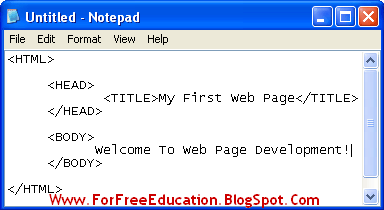
    Now we will create a simple web page to display some text like "Welcome to Web Page Development!" and with a title "My First Web Page".


    1. Type HTML Code in Note Pad

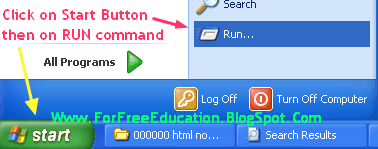
    Open Note pad and type the following HTML code.
    <HTML>
    <HEAD>
    <TITLE>My First Web Page</TITLE>      
    </HEAD>
    <BODY>
    Welcome To Web Page Development!
    </BODY>
    </HTML>

    Picture: Create Your First  Web Page in HTML in 5 minutes


    Create Your First  Web Page in HTML Easily - Instructions with Pictures


    How to Create Your First  Web Page in HTML


    Picture: Create Your First  Web Page in HTML Easily

    How to Create Your First  Web Page in HTML Easy Tutorial


    2. Save HTML Document with HTML extension

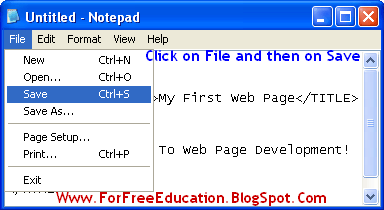
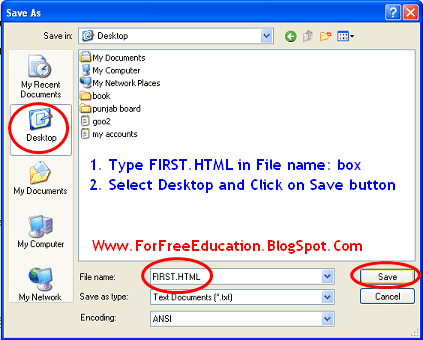
    Save this file as "FIRST.HTML". Click on File menu, click on Save, Type "FIRST.HTML" in file name box, select Desktop as a location to save, click on Save Button.

    Create Your First  Web Page in HTML

    Picture: Create Your First  Web Page in HTML Made Easy

    Easy Tutorial Create Your First  Web Page in HTML

    3. View Your Web Page in Web Browser

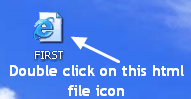
    You will see that the file will be saved with a blue "e" Internet Explorer icon. Double click on the file and view the resulting web page in internet explorer window. You can see the pictures given to learn web page creation easily:

    Create Your First  Web Page in HTML in 5 minutes


    Picture: Create Your First  Web Page in HTML ( Final Product = The Output )

    Made Easy Create Your First  Web Page in HTML in 5 minutes

    Basic Structure of HTML Document

    Basic Structure of HTML Document 

    The basic structure of an HTML document is given below:
    <HTML>
            <HEAD>
             
           </HEAD>


           <BODY>

            
          </BODY>

    </HTML>
    The above format shows that an HTML document starts
    with <HTML> tag and ends with </HTML> tag. It is also clear
    that an HTML document consists of two main sections:


    1.  Head Section

    Head section is used to specify a title of the web
    page, normally. There are some other uses of Head section too, like linking
    external style sheets and Java script code, etc. Head section starts with the <HEAD>
    tag
    and ends with the </HEAD> tag. <TITLE> tag is used to
    display a title of the web page on title bar of the web browser.


    basic structure of html web page document

    1. Body Section

    Body section contains all the text and tags. It is used to specify the actual
    content of the web page. Body section starts with <BODY> tag and
    ends with </BODY> tag.

    How To Create a Web Page In HTML

    If you want to create a web page using HTML - Hyper Text Markup Language, you will need the following two software:
    1. Text Editor: It is used to write HTML tags according to the requirements of the web page. Windows Notepad is a suitable candidate for this purpose. You have to save the HTML document with html or htm extension. For example, type the name of your web page document as "first.html".


    1. Web Browser: Web Browser is a software used to view web pages. Examples of a web browser are Internet Explorer, Mozilla Firefox and Google Chrome. Microsoft Windows users can view and test their web pages, in Internet Explorer. 


    I will discuss the Basic Structure of an HTML Document, in my next post.

    Find Your Correct Age From Date of Birth

    First of all click on First two digits to type Month number from keyboard like any number from 1 to 12. . Now click on next two digits and t...