Wednesday, November 23, 2011

Explain Advantages Of Networks

Define Network with examples. Give importance of Computer Network.

COMPUTER NETWORK

We can define a Computer Network as a set of two or more connected computers to share information and other resources (data, files, printers, hard disk, modem, CD-Rom Drive, CD-Writer, DVD-Rom Drive, DVD-Writer etc.). The computers in a network can share:
Data, Information, Files
Software
Hardware (printers, disk, modems)etc.
Advantages of Computer Networks

EXAMPLES OF COMPUTER NETWORK

  • Computer network can be used in an office. Different people in the office can share common information and printer.
  • Net Cafes use Computer Network for internet sharing. Net Cafe Owners can save money by sharing one DSL Routers / Modem and a single Internet Connection.
  • Computer Network is used in Computer Laboratories of Schools, Colleges and other educational institutes.
  • Internet, is also an example of a computer network. Internet is a network of millions of computers connected through phone lines. People can share information, files and talk with one another through internet.


    ADVANTAGES OF COMPUTER NETWORKS

    Following are some important advantages of computer networks:

    1. Data and Information Sharing

    Different employees of an organization can share common information with the help of computer network.

    2. Software Sharing

    Different software can be shared with the help of computer networks.

    3. Hardware Sharing

    Different hardware can be shared with the help of computer networks. For example, if there are five computer users in an office, we can save cost by using only one printer with the help of computer networking. In a computer network, only one computer will manage all printing needs of the computer users in a small office. In addition, we can share other hard ware devices like hard disks, CD-Rom Drives / Writers, modems, routers and scanners etc.

    4. Money Saving

    We can save a lot of money by using computer networking, because of sharing the same software and hardware in a network.

    5. Internet Sharing

    We can buy only one DSL internet connection and share it with in whole organization with the help of computer networking.

    6. Easy Communication Within Organization

    We can send and receive messages and files through network. In this way, a file can be moved to one place to another within an organization without the need of a physical worker to take and carry the files to a destination. With the help of a command in a computer we can transfer file within seconds from one room to another.

    7. Easy Communication Outside Organization

    We can send and receive emails and share files with other people outside organization using internet.

    Read  More on Networking
    and Networks
    1 Explain
    Advantages Of Networks
    2 Types
    Of Computer Networks
    3 Differences
    between LAN and WAN
    4 Types
    Of Network Topology
    5 Bus
    Topology :Advantages and Disadvantages
    6 Advantages
    and Disadvantages of Star Topology
    7 Advantages
    and Disadvantages of Ring Network Topology
    8 Advantages
    and Disadvantages of Tree Topology
    9 Advantages
    and Disadvantages of Mesh Topology

    Monday, November 21, 2011

    Types Of Scanners Input Device

    Scanner / Optical Scanner

    A scanner is an input device for computer. It can scan any printed document with text as well as images. It will :
    • Read any printed paper or picture,
    • Convert text or images into digital form
    • Saves this converted digital file into computer storage for later use

    Uses Of Optical Scanners

    You can scan your documents or pictures to:
    1. Store into computer memory.
    2. To save lot of effort and time because if you type the whole text on printed page, it will take effort as well as time).
    3. Show image or text on computer screen or on a multimedia projector's screen.
    4. In addition, you can send this scanned document or image to your friends all over the world with the help of Internet & Email.
    5. You can publish the scanned documents or images on your website or blog.
    6. You can apply online and send the scanned images of your academic documents in any part of the world within minutes.
    7. If your scanner supports OCR - Optical Character Recognition, you can scan a page with printed text and save it in an editable computer file. You can change or add more contents in this scanned file.

    Types Of Optical Scanners

    There are different types of scanners:

    1. Flat Bed Scanner


    A flatbed scanner is the most common type of optical scanners used to scan printed text and images and save into computer storage as a digital file. It works on the principle of a photo copier machine. We pickup the cover of the scanner and place the printed page on the glass surface of the scanner. Now we will instruct scanner through computer software to start scanning. The scanner will scan with the help of light and save the digital file into computer storage. If you have an OCR scanner, you can save your text into editable form. This will save a lot of hard work and time to enter text by keyboard too. It is widely used in offices, schools, colleges, universities and homes for common scanning needs. If a book is very rare or difficult to find, we can scan its all pages one by one. Later on we can take prints of these scanned pages through a color printer.

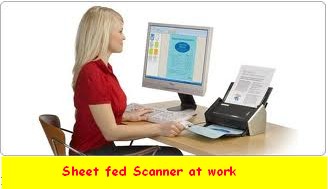
    2. Sheet Fed Scanner


    A sheet fed scanner works like a fax machine mechanism. In a sheet fed scanner, pages are entered into scanner like a fax machine.

    Advantages of Sheet Fed Scanner

    1. A feet shed scanner is relatively smaller in size.
    2. It is more portable.
    3. It takes less space.

    Disadvantages Of Sheet Fed Scanner

    1. It requires separate pages to scan. But, it cannot scan a book because of its binding. 
    2. It can scan normal papers with normal thickness only. 

    3. Hand Held Scanner


    Hand Held scanner is a small, light weight scanner and portable scanner. It is used to scan small amount of data like short articles from news papers. It is held in hand and is moved over the text page or image slowly and smoothly from start to end. Its scan quality may be lower than flat bed or sheet fed scanner but it can used to capture small amounts of text or small images, quickly.

    SkyPix Hand held Scanner


    This is a portable, cordless hand held scanner that is used to scan and save important documents, letters, or pictures. It records scanned documents in its memory card. you can transfer these scanned documents on yor computer for later use. You can scan and save important news from the news papers or interesting articles from magazines.

    4. Drum Scanners


    Drum scanners are used by the Publishers to scan images with details. Drum scanners use photomultiplier tube technology. In drum scanners, the document to be scanned is mounted on a glass cylinder. At the center of the cylinder is a sensor that splits light bounced from the document into three beams. Each beam is sent through a color filter into a photomultiplier tube where the light is changed into an electrical signal. And in this way a complete image with immense details can be obtained. Drum scanners are widely used in publishing industry.

    Thursday, November 17, 2011

    Uses Of Computer In Science

    Today, computers are being used in every field of life. Here we discuss Uses of Computers in Science:


    Six Uses of Computers in Science

    Data Collection

    Uses of Computers in Science
    Uses of Computers in Science

    Scientists use computers to collect data and make hypotheses on the basis of collected data.

    Analysis and Testing Of Data

    Scientists use computers to analyze collected data and test their hypotheses.

    Exchanging Information

    Scientists use computers to exchange information with their colleagues. Different Researches all over the world can share their research with one another. This will be helpful for research because this will increase the rate of completion of research projects.

    Simulation of Different Events

    Scientists may use computers for simulation of complex events. For example, they can use computer simulation to predict about the affects of earthquake on buildings in a particular area. They may use computer simulation to know the effects of rapid population increase on weather conditions. In fact, computer simulation of such complex events will save time as well as cost. Computer simulation can also provide a feasible solution to many problems.

    Use Of Computer in Medical Science

    Uses of Computers by scientists in Science
    Uses of Computers by scientists in Science


    Computers may also be used to simulate the functions of parts of human body. For example, computers may simulate cell division, internal structure of molecules, a virus or bacteria attack etc.

    Uses of Computer in Space Science

    Computers are playing an important role to explore the outer space. The computers are mostly used to collect space data, perform experiments and prepare results. Computers are used to operate certain machines and robots to collect information from space and send it back on earth.
    Further Suggested Reading:

    Wednesday, November 16, 2011

    Explain Main Difference Between System Software and Application Software

    Topic: Explain Main Difference Between System Software and Application Software
               Differentiate between system software and application software

    Before , explaining the main differences between application software and system software, let us know the definitions of Application software and System software with examples.

    What is System Software:

    System software is a set of programs to control all components of computer and to manage overall operations of computer system.

    Differences between System software and application software
    Differences between System software and application software

    System software is used as a base to install and run all application software.

    Examples of system software include:

    1. Operating Systems, like Microsoft Windows, DOS, Unix and Linux
    2. Device Drivers like Device driver software of a Printer (found on CD normally provided with the printer)
    3. Utility Programs like AVAST anti virus, Disk Scanners and File Viewers etc.

    Differences between system software and application software - role of operating system


      What is Application Software?

      Users can use Application Software to perform different applications on computer. Application Software generally performs a specific task for a computer user.

      Examples of Application software include:

      1. Wordprocessors like Microsoft Word
      2. Spreadsheet Software like MS Excel
      3. Database software like Microsoft Access etc.

      Six Differences between System Software and Application Software

      System Software


      Application Software


      1. It is a set of programs to control computer components and operations.

      1. It is used to solve particular problems of user.

      2.  It is general-purpose software.

      2. It is specific purpose software.

      3. It executes all the time in computer. Because it controls overall operations and components of computer.

      3. It executes as and when required. For example, if we need to write a letter, we will open Microsoft Word - an application software. And after we have written and printed the letter, we will close Microsoft Word.

      4. The number of system software is less than application software.

      4. The number of application software is much more than system software.

      5. System software is essential for a computer to work. Without System software (like operating systems), a computer is useless. We cannot use computer hardware without system software. That is why we install an operating system first of all, after buying a new computer.

      5. Application software is not essential for a computer to work. For example, if we need to play some games then we buy a game CD or download games from internet, and install in our computer.

      6. Examples are: Windows, Dos, Unix, Linux, Norton Antivirus etc.
      6. Examples are: MS Word, MS Excel, MS Power point etc.

      You may also like:

      Topic: Explain Main Difference Between System Software and Application Software
                 Differentiate between system software and application software

      Tuesday, November 15, 2011

      Customized and Packaged Software


      Q. Explain Customized software and Packaged software.

      a) Customized Software


      Customized software is a type of application software that is designed for a particular customer or organization. When packaged software does not fulfill needs of an organization then a programmer / software developer / software engineer is hired. The programmer will develop needed custom software for that organization according to the organizations specific needs and requirements.
      Student Information software developed for Govt. Post Graduate College of Commerce, Rahim Yar Khan is an example of customized software.  It will be used to store all related data about students, admissions and examinations etc.

      b) Packaged Software


      Packaged software is a type of application software that is developed for sale to the general public. It is also known as off-the-shelf software or Pre-Written software. It facilitates the people to perform day-to-day activities. Examples of packaged software are word processing software and spread sheet software.
      For example, Microsoft Office is a packaged software. Microsoft Office is a set of different application software like Microsoft Word, Microsoft Excel, Microsoft Access and Microsoft Power Point.

      Sunday, November 6, 2011

      Define Web Server, Web Browser, WWW, ISP

      Q. Write notes on the following:
      WWW, ISP, WEB PAGE, WEB SITE, WEB SERVER, WEB BROWSER


      WWW

      WWW stands for World Wide Web. It is also called web. It is the collection of all connected web documents stored on different web servers. These documents contain information in the form of text, pictures, audio and video clips. WWW has many advantages:
      · finding a job
      · searching information
      · advertisement for business
      · weather forecast
      · entertainment
      · education

      Difference between Internet and World wide web:


      The main difference between internet and World Wide web is that World Wide Web is only a service provided by internet. It provides access to web documents. While internet provides many other services also like FTP, TELNET and chatting etc.

      ISP (Internet Service Provider) OR IAP (Internet Access Provider

      ISP stands for internet service provider. It is a company that provides internet connections to users. For example WOL net, PAK net, CYBER net etc. are ISPs. To connect to internet, users have to get internet connection from an ISP. These days, internet scratch cards are also available. ISP will provide you a user name, password. It will also provide a telephone number to connect to internet.
      There are many ISPs these days in every big city of the country. A good ISP has the following features:
      · Low rate
      · Fast browsing
      · Fast downloading and uploading
      · Good customer support

      WEB PAGE

      A document created by HTML and found on web is a web page. A web page contains information in the form of text, pictures, audio and video clips. These web pages are stored on special computers called WEB SERVERS.

      WEB SITE

      A collection of related and interlinked web pages is called a web site. A web site may have many pages. Each web page will provide different information. For example, a web site for a College can have a Home page, Faculty page, Courses page, Games page and contact page. Home page is the main page of any web site. We can see all other pages by links provided in home page. Each web site has a unique address. For example web address of Baha-ud-din Zakaria University is www.bzu.edu.pk.

      WEB SERVER

      Web documents are stored on special and powerful computers called WEB SERVERS. Web servers are permanently connected to internet. When we type address of a web site in a browser (internet explorer), then web server fulfills this request. They provide requested information in the form of web page.

      WEB BROWSER

      A browser is software that is used to view web pages on internet. Many web browsers are available. But Mozilla Firefox, Google Chrome and Internet explorer are the most popular. We type address of any web site in address bar of browser and press ENTER key. Then first page called HOME PAGE of web site is displayed in browser window.

      Monday, October 31, 2011

      Fundamentals of Data Processing - For Test, Interview and Viva

      Fundamentals of Data Processing - Short Questions For Test, Interview and Viva

      Q.1 Define Data and Information. Differentiate between Data and Information.

      DATA

      Data is the collection of raw facts and figures. It is without any proper meaning.
      Data may be collection of words, numbers, graphics or sounds.

      Examples of Data

      1) When students get admission in a college. They fill admission form. This form contains raw facts (data of student) like name, father’s name, address of student etc.
      2) During census, data of all citizens is collected.

      INFORMATION

      Processed data is called information. When raw facts and figures are arranged in some order then they become information. Information has proper meanings. Information is useful in decision-making. Actually we process data to convert it into information.

      Exapmle of Information:

      1) Stored data of students can be used to print address labels of students.
      2) Census data is used to get report/information about total population of a country and literacy rate etc.

      Q.2 Describe types of Data.

      There are followimg types of Data.
      1) NUMERIC DATA:Numeric data consists of 0 to 9 digits, + and – sign and decimal point etc.
      For example, 10, 78, 90.50, -56 etc
      2) ALPHABETIC DATA
      It consists of all alphabetic letters A to Z, a to z and blank space etc. For example, Pakistan, Ahmad, Abdul Rahim, GCC , RYK, Ahmad etc.
      3) ALPHANUMERIC DATA
      It consists of alphabet letters, digits and special characters like #, $, % etc.
      For example, House Number 10-A, 14-August-1947, F-16 etc.
      4) GRAPHIC DATA
      Graphic data or image data consists of charts, graphs and images etc. For example a collection of maps of countries, a collection of family pictures etc.
      5) AUDIO DATA
      Audio data consists of sounds and voices. For example audio naat, radio program, radio news
      VIDEO DATA:Video data consists of moving pictures. For example movie, TV dram, TV news etc.
      6) MIXED DATA:Mixed data consists of combined data of two or more types. For example, TV drama consists of audio as well as video data.

      DIFFERENCE BETWEEN DATA AND INFORMATION


      DATA
      INFORMATION
      1
      Data is collection of raw facts and figures.
      Information is processed data.
      2
      Data is not arranged.
      Information is arranged.
      3
      Data is unorganized.
      Information is organized.
      4
      Data is not so meaningful.
      Information is Meaningful.
      5
      Data is input.
      Information is out put.

      Q.3 Define data processing and explain types of data processing.

      DATA PROCESSING

      Data processing is the sequence of operations performed on data to convert it into useful information. These operations may be arithmetic, statistical or logical operations. We can arrange or classify data.

      TYPES OF DATA PROCESSING (OR) LEVELS OF DATA PROCESSING)

      There are three types of data processing.

      1) Manual data processing

      In manual data processing data is processed manually. No machine or tool is used.
      All the calculations on data are performed manually. This is a slow method and errors may occur..

      2)Mechanical Data Processing

      In mechanical data processing data is processed with calculators or other mechanical devices. This method is faster and more accurate than manual data processing.

      3) Electronic data processing

      It is the latest method of data processing. Data is processed with computer

      Q.4 Describe how data is transformed into information. OR Explain Data Processing Cycle.

      DATA PROCESSING CYCLE

      After collecting data, it is processed to convert into information. The data is processed again and again until accurate result is achieved. This is called data processing cycle. Data processing cycle involves following three basic activities: 1) Input 2)Processing 3) Output

      Q.5 What is the need of Data processing in business?

      NEED OF DATA PROCESSING IN BUSINESS
      There is no more business without information. To improve the business there is a need to improve data processing and information system. The need of data processing in business is clear. Following are the reasons:
      RECORD KEEPING , ACCESSING RECORDS , COMMUNICATION, COST, SPEED, ACCURACY, REPORTS

      Find Your Correct Age From Date of Birth

      First of all click on First two digits to type Month number from keyboard like any number from 1 to 12. . Now click on next two digits and t...