C Plus Plus Programming Practical ACS Advanced Computer Studies

C Plus Plus Programming Practical Advanced Computer Studies

Here is a sample old question paper for guiding the students about the practical examination.


C++ Programming Practical will be of  20 marks.
Time allowed will be 1 hour 30 Minutes.
Section One contains only one compulsory question of Viva Vice ( Oral questioning)
Question No: 1 will be compulsory , VIVA VOCE of 5 marks.

In Section -II , You have to attempt any two questions(programs) out of  3 questions
Question No 2: C++ Program of 7.5 Marks
Question No 3: C++ Program of 7.5 Marks
Question No 4: C++ Program of 7.5 Marks
Sample Old Question Paper C++ Programming Practical for Advanced Computer Studies
C++ Programming Practical for Advanced Computer Studies

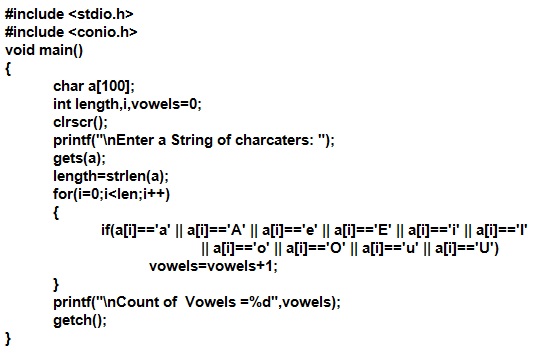
A sample solution to program 1:

Count number of vowels in a string  c program
Count number of vowels in a string  c program


Count number of vowels in a string output of c program

Comments

Popular posts from this blog

Types Of Headings In HTML

HTML Hedings Headings in HTML are used to display Titles, Sub-Titles of Sub-Sub-Titles for your web page text. There are six types of headings in HTML. H1 is the largest heading and H6 is the smallest heading. <H1> is opening tag whereas </H1> is the closing tag for the largest heading. The text between <h1> and </h1> will be displayed as the main Title in your web page. Following are the six tags used for six types of headings in HTML. <H1> ... </H1> <H2> ... </H2> <H3> ... </H3> <H4> ... </H4> <H5> ... </H5> <H6> ... </H6> The H1 heading is used for main titles. Actually H1 heading will show the text in largest font size. H2 headings is used for Sub-Titles. H2 displays text in smaller font size than H1, H3 displays text of font size smaller than H1 and H2, and so on. H1 is for largest heading in a text page and H6 is for smallest heading.   Importance Of Headings in SEO H...

HTML Table Tag Basics

Tables Tables are very important to show data in the form of rows and columns. Tables make data more readable and easy to understand. A table consists of rows, columns and cells. HTML Tags To Make A Table As we know that there are basically three elements in a table, that is, rows, columns and cells. So, there are the following basic tags to create a table in an HTML web page: <TABLE> tag <TR> tag <TD> tag <TH> tag   <TABLE> Tag <Table> tag is used to specify the start of a table. It also specifies some attributes of the table like ALIGN and BORDER attributes etc. Example 1: <Table>                    => Table without a border. Example 2: <Table border="1">     => Table with a border of width 1. Example 3: <Table align="left" border="2">  => A left aligned Table with a border of width 2. ...

Bus Topology Advantages Disadvantages

Bus Topology Bus topology is the simplest network topology . In bus topology , all computers in network are connected to a common communication wire. This wire is called BUS. Terminators are used at both ends of wire. Bus Topology is Cheap, easy to handle and implement. Bus Topology require less cable. Bus Topology is best suited for small networks. Working of Bus Topology with Advantages and Disadvantages Advantages of Bus Network Topology 1. It is very simple topology . 2. It is easy to use. 3. It needs small amount of wire for connecting computers. 4. It is less expensive due to small wire needed. 5. If one computer fails, it does not disturb the other computers in network. Other computers will continue to share information and other resources with other connected computers. Disadvantages of Bus Network Topology 1. Only small number of computers can be connected in a bus network . 2. Network speed slows down as the number of computer increases in b...