Wednesday, December 21, 2011

Create Your First Web Page in HTML

Today, we will discuss the topic Create Your First  Web Page in HTML. As we know a website is a set interlinked related web pages. Therefore, to design and develop a website, we need to know creating web pages. HTML stands for Hyper Text Markup Language. HTML is the basic language used to create web pages.
Let's start our tutorial with suitable pictures Create Your First  Web Page in HTML.
Now we will create a simple web page to display some text like "Welcome to Web Page Development!" and with a title "My First Web Page".


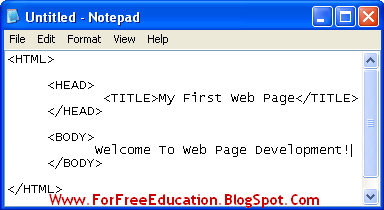
1. Type HTML Code in Note Pad

Open Note pad and type the following HTML code.
<HTML>
<HEAD>
<TITLE>My First Web Page</TITLE>      
</HEAD>
<BODY>
Welcome To Web Page Development!
</BODY>
</HTML>

Picture: Create Your First  Web Page in HTML in 5 minutes


Create Your First  Web Page in HTML Easily - Instructions with Pictures


How to Create Your First  Web Page in HTML


Picture: Create Your First  Web Page in HTML Easily

How to Create Your First  Web Page in HTML Easy Tutorial


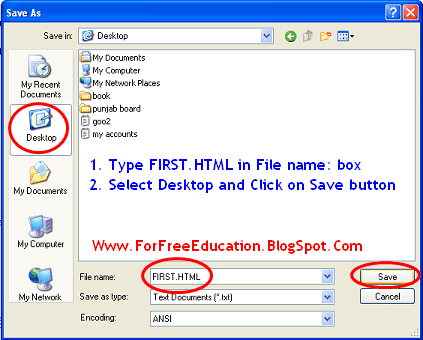
2. Save HTML Document with HTML extension

Save this file as "FIRST.HTML". Click on File menu, click on Save, Type "FIRST.HTML" in file name box, select Desktop as a location to save, click on Save Button.

Create Your First  Web Page in HTML

Picture: Create Your First  Web Page in HTML Made Easy

Easy Tutorial Create Your First  Web Page in HTML

3. View Your Web Page in Web Browser

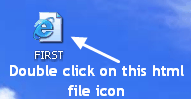
You will see that the file will be saved with a blue "e" Internet Explorer icon. Double click on the file and view the resulting web page in internet explorer window. You can see the pictures given to learn web page creation easily:

Create Your First  Web Page in HTML in 5 minutes


Picture: Create Your First  Web Page in HTML ( Final Product = The Output )

Made Easy Create Your First  Web Page in HTML in 5 minutes

Basic Structure of HTML Document

Basic Structure of HTML Document 

The basic structure of an HTML document is given below:
<HTML>
        <HEAD>
         
       </HEAD>


       <BODY>

        
      </BODY>

</HTML>
The above format shows that an HTML document starts
with <HTML> tag and ends with </HTML> tag. It is also clear
that an HTML document consists of two main sections:


  1.  Head Section

Head section is used to specify a title of the web
page, normally. There are some other uses of Head section too, like linking
external style sheets and Java script code, etc. Head section starts with the <HEAD>
tag
and ends with the </HEAD> tag. <TITLE> tag is used to
display a title of the web page on title bar of the web browser.


basic structure of html web page document

  1. Body Section

Body section contains all the text and tags. It is used to specify the actual
content of the web page. Body section starts with <BODY> tag and
ends with </BODY> tag.

How To Create a Web Page In HTML

If you want to create a web page using HTML - Hyper Text Markup Language, you will need the following two software:
  1. Text Editor: It is used to write HTML tags according to the requirements of the web page. Windows Notepad is a suitable candidate for this purpose. You have to save the HTML document with html or htm extension. For example, type the name of your web page document as "first.html".


  1. Web Browser: Web Browser is a software used to view web pages. Examples of a web browser are Internet Explorer, Mozilla Firefox and Google Chrome. Microsoft Windows users can view and test their web pages, in Internet Explorer. 


I will discuss the Basic Structure of an HTML Document, in my next post.

Introduction To HTML

HTML stands for Hypertext Markup Language. Hypertext refers to the text with Links. These links may point to sections of the same web page or any other web page within or outside the website.

HTML Definition

HTML is a language used to create and format web pages. HTML is used to define the structure and format of a web page. HTML will place and format the contents like text, pictures, audio or video data in your web pages. Moreover,you can use Links to connect the related web pages in the form of a website.


 Who Invented HTML?

HTML was developed by Tim Berners Lee in 1989.

TAGS and Elements

HTML uses commands called TAGS to create and format different elements
and contents of a web page. HTML tags are enclosed within angle brackets <>. For example <b> tag is used to format some text as bold text.
Normally, tags work in pairs as shown in the example below.

<b> This is bold text. </b>
The output of the above HTML command or tag will be as show next in blue:
This is bold text.

The <b> tag is called Opening Tag or start tag, whereas </b>
tag is called Closing Tag or end tag. most of the tags use both opening
and closing tags. A few tags like <br> tag (used for line break)
and <hr> tag (used for horizontal rule, that is, a horizontal line)
is used as single tags. They do not need closing tags. Such tags are also called
Empty Tags.
Every HTML Tag is related to some HTML element. For example, <TABLE>
tag
is used to create a table HTML element. Each HTML documents consists of
HTML elements.

Attributes

An attribute is an additional information to implement a tag. It gives some
extra information to enhance the format of the element related to that tag. For
example, <TABLE> tag is used to create a table in a web page. If we use a
<TABLE> tag without a BORDER attribute, table element will have no
border. If we use BORDER="1" in opening <TABLE> tag,
table will be created with a border.  BORDER is the attribute to
specify border width for a table and 1 is the value assigned to BORDER
attribute, as shown below:


<TABLE BORDER="1">          
                                           
.

.

.

</TABLE>                                  

Note: Attribute is used in Opening Tag always like BORDER="1".
Note: No attribute in Closing Tag.

Sunday, December 4, 2011

Advantages and Disadvantages of Mesh Topology

Topic: Advantages and Disadvantages of Mesh Topology

Mesh Topology

In a mesh topology, every device on the network is physically connected to every other device on the network. Therefore, data can be sent on several possible paths from source computer to destination computer. Mesh topology is more reliable with better performance. Mesh Network Topology is mostly used in wide area networks where reliability is important.

Advantages and disadvantages of Mesh network Topology


Advantages of Mesh Network Topology

1. Since, there are many links to transfer data, Mesh topology gets rid of the traffic problem. Data may be transferred through different links.
2. If one link becomes unusable, it does not disturb the whole system. Other links can be used for communication.
3. Since each node has physical connection with other nodes, therefore, one node can transfer data to many nodes at the same time.

Disadvantages of Mesh Network Topology

1. It is very expensive due to implementation of multiple links for each node.
Sponsored Links
2. It is difficult to install and reconfigure.
3. Adding or removing a computer is difficult.


Read  More on Networking
and Networks
1 Explain
Advantages Of Networks
2 Types
Of Computer Networks
3 Differences
between LAN and WAN
4 Types
Of Network Topology
5 Bus
Topology :Advantages and Disadvantages
6 Advantages
and Disadvantages of Star Topology
7 Advantages
and Disadvantages of Ring Network Topology
8 Advantages
and Disadvantages of Tree Topology
9 Advantages
and Disadvantages of Mesh Topology

Topic: Advantages and Disadvantages of Mesh Topology

Advantages and Disadvantages of Tree Topology

Tree Topology

Actually, a Tree topology is the combination of two topologies: bus topology  and star topology. A tree topology combines the characteristics of bus and star topologies. It consists of groups of computer connected as star topology. These groups are then connected to a central communication medium (bus cable).

Advantages and Disadvantages of Tree Network Topology


Advantages of Tree Network Topology

1. Many software and hardware vendors support tree topology.
2. It provides point-to-point wiring for individual groups.

Disadvantages of Tree Network Topology

1. If the main backbone line breaks, the entire tree network goes down.
2. A tree network is more difficult to configure and maintain.
3. If any hub fails, related segment will be removed from the network.

Read  More on Networking
and Networks
1 Explain
Advantages Of Networks
2 Types
Of Computer Networks
3 Differences
between LAN and WAN
4 Types
Of Network Topology
5 Bus
Topology :Advantages and Disadvantages
6 Advantages
and Disadvantages of Star Topology
7 Advantages
and Disadvantages of Ring Network Topology
8 Advantages
and Disadvantages of Tree Topology
9 Advantages
and Disadvantages of Mesh Topology

Advantages and Disadvantages of Ring Network Topology

Topic: Advantages and Disadvantages of Ring Network Topology alongwith detailed working of Ring topology

What Do You Mean by Ring Topology?

In Ring topology, each computer is connected to the next computer such that last computer is connected to the first. Every computer is connected to next computer in the ring. Each computer retransmits what it receives from the previous computer. Suppose, computer A needs to send data to computer D. Now the computer A sends data to computer B. As computer B is not the destination computer, so it will retransmit data to computer C. Finally, Computer C will transfer data to computer D, the destination computer. When a node sends a message, the message is processed by each computer in the ring. If a computer is not the destination node, it will pass the message to the next node, until the message arrives at its destination.


Advantages of Ring Network Topology

1. It is relatively less expensive than a star topology network.
2. In a Ring topology, every computer has an equal access to the network.
3. Performs better than a bus topology under heavy network load

Disadvantages of Ring Network Topology

1. Failure of one computer in the ring can affect the whole network.
2. It is difficult to find faults in a ring network topology.
3. Adding or removing computers will also affect the whole network since every computer is connected with previous and next computer.
4. Sending a message from one computer to another takes time according to the number of nodes between the two computers. Communication delay is directly proportional to number of nodes in the network.

Read  More on Networking
and Networks
1 Explain
Advantages Of Networks
2 Types
Of Computer Networks
3 Differences
between LAN and WAN
4 Types
Of Network Topology
5 Bus
Topology :Advantages and Disadvantages
6 Advantages
and Disadvantages of Star Topology
7 Advantages
and Disadvantages of Ring Network Topology
8 Advantages
and Disadvantages of Tree Topology
9 Advantages
and Disadvantages of Mesh Topology

Find Your Correct Age From Date of Birth

First of all click on First two digits to type Month number from keyboard like any number from 1 to 12. . Now click on next two digits and t...