Sunday, December 4, 2011

Advantages and Disadvantages of Tree Topology

Tree Topology

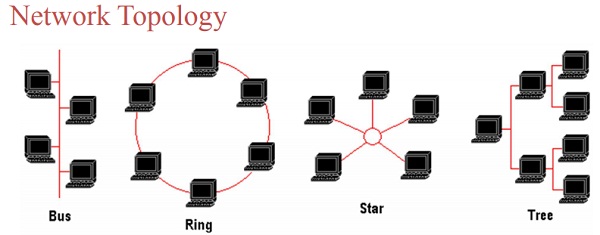
Actually, a Tree topology is the combination of two topologies: bus topology  and star topology. A tree topology combines the characteristics of bus and star topologies. It consists of groups of computer connected as star topology. These groups are then connected to a central communication medium (bus cable).

Advantages and Disadvantages of Tree Network Topology


Advantages of Tree Network Topology

1. Many software and hardware vendors support tree topology.
2. It provides point-to-point wiring for individual groups.

Disadvantages of Tree Network Topology

1. If the main backbone line breaks, the entire tree network goes down.
2. A tree network is more difficult to configure and maintain.
3. If any hub fails, related segment will be removed from the network.

Read  More on Networking
and Networks
1 Explain
Advantages Of Networks
2 Types
Of Computer Networks
3 Differences
between LAN and WAN
4 Types
Of Network Topology
5 Bus
Topology :Advantages and Disadvantages
6 Advantages
and Disadvantages of Star Topology
7 Advantages
and Disadvantages of Ring Network Topology
8 Advantages
and Disadvantages of Tree Topology
9 Advantages
and Disadvantages of Mesh Topology

Advantages and Disadvantages of Ring Network Topology

Topic: Advantages and Disadvantages of Ring Network Topology alongwith detailed working of Ring topology

What Do You Mean by Ring Topology?

In Ring topology, each computer is connected to the next computer such that last computer is connected to the first. Every computer is connected to next computer in the ring. Each computer retransmits what it receives from the previous computer. Suppose, computer A needs to send data to computer D. Now the computer A sends data to computer B. As computer B is not the destination computer, so it will retransmit data to computer C. Finally, Computer C will transfer data to computer D, the destination computer. When a node sends a message, the message is processed by each computer in the ring. If a computer is not the destination node, it will pass the message to the next node, until the message arrives at its destination.


Advantages of Ring Network Topology

1. It is relatively less expensive than a star topology network.
2. In a Ring topology, every computer has an equal access to the network.
3. Performs better than a bus topology under heavy network load

Disadvantages of Ring Network Topology

1. Failure of one computer in the ring can affect the whole network.
2. It is difficult to find faults in a ring network topology.
3. Adding or removing computers will also affect the whole network since every computer is connected with previous and next computer.
4. Sending a message from one computer to another takes time according to the number of nodes between the two computers. Communication delay is directly proportional to number of nodes in the network.

Read  More on Networking
and Networks
1 Explain
Advantages Of Networks
2 Types
Of Computer Networks
3 Differences
between LAN and WAN
4 Types
Of Network Topology
5 Bus
Topology :Advantages and Disadvantages
6 Advantages
and Disadvantages of Star Topology
7 Advantages
and Disadvantages of Ring Network Topology
8 Advantages
and Disadvantages of Tree Topology
9 Advantages
and Disadvantages of Mesh Topology

Explain Star Network Topology With Advantages and Disadvantages

Topic: Explain the Working Star Network Topology With Advantages and Disadvantages

Star Topology

Star Topology is the most popular and widely used network topology in local area networks. In star topology, all computers are connected with a central device known as HUB or Switch. Now-a-days Hubs are often replaced by Fast Network Switches.

The working of Star Topology

The sender computer sends data to the hub. The hub sends it to the destination computer. So, all data communication is managed through HUB or Switch.
In a star network, each node (file server, workstations, and peripherals) is
connected to a central device called a hub.  The hub takes a signal that comes from any node and passes it along to all the other nodes in the network.
The star topology reduces the chance of network failure by connecting
all of the systems to a central node.

Explain Star Network Topology With Advantages and Disadvantages
What is Star topology?  Advantages and Disadvantages of star topology


Note: The major difference between a Networking Hub and Networking Switch is that HUB sends data to all computers, and the destination computer will accept it while other computers will not. On the other hand, Switch sends data only to the destination computer. Therefore, switch can reduce network traffic and hence provides fast transmission speed.
working Advantages disadvantages and diagram of Star Topology


Advantages of Star Network Topology

1. Star Network Topology Supports Easy Installation and maintenance

It is easy to maintain network. That is why it is so popular.

2. Star Topology Supports Adding or removing computers easily

Adding or removing computers can be done without disturbing the network. We connect the new computer with the HUB by means of a networking cable. One end of the cable (RJ 45 connector) is inserted in computer’s Network Interface Card and the other end (RJ 45 connector) is plugged into the HUB, and that’s it.

3. Star Topology for Easy Fault Diagnosis

In a star network topology, finding faults is easy. If a computer is no more connected with your network, you can check its cable and connectors or network settings in its Operating system.

4. Star Network Topology Supports Network Reliability

Single computer failure will not disturb whole network, since all other computers are connected with separate links ( wires ) to HUB. Definitely, they will work fine. Therefore, only the faulty computer will not be able to communicate with other computers in the Local Area Network.

5. Star Network Topology for Better performance

Star topology can prevents the passing of data through an excessive number of nodes. By using a Switch, at most, 3 devices and 2 links are involved in any communication between any two devices.
6. Device Isolation
Each device is separately connected to HUB or Switch and is isolated. This is why each device works independently.

Disadvantages of Star Network Topology

1.  Failure of central HUB in Star Topology

In star network topology, data communication depends on HUB. If central hub fails, then whole network fails.

2.  A Lot of Cable is required in Star Topology

Since each computer will be connected with HUB by means of a separate networking wire, star network topology needs more communication cable to connect computers.

3.  Star Topology is More Expensive

It is more expensive due to more wires. Since every node in a star network topology is connected with HUB through a separate networking wire, therefore, a lot of wires are needed for constructing and maintaining a star network topology


Read  More on Networking
and Networks
1 Explain
Advantages Of Networks
2 Types
Of Computer Networks
3 Differences
between LAN and WAN
4 Types
Of Network Topology
5 Bus
Topology :Advantages and Disadvantages
6 Advantages
and Disadvantages of Star Topology
7 Advantages
and Disadvantages of Ring Network Topology
8 Advantages
and Disadvantages of Tree Topology
9 Advantages
and Disadvantages of Mesh Topology

Topic: Explain the Working Star Network Topology With Advantages and Disadvantages

Bus Topology Advantages Disadvantages

Bus Topology

Bus topology is the simplest network topology. In bus topology, all computers in network are connected to a common communication wire. This wire is called BUS. Terminators are used at both ends of wire.
Bus Topology is Cheap, easy to handle and implement. Bus Topology require less cable. Bus Topology is best suited for small networks.
Working of Bus Topology with Advantages and Disadvantages


Advantages of Bus Network Topology


1. It is very simple topology.
2. It is easy to use.
3. It needs small amount of wire for connecting computers.
4. It is less expensive due to small wire needed.
5. If one computer fails, it does not disturb the other computers in network. Other computers will continue to share information and other resources with other connected computers.

Disadvantages of Bus Network Topology


1. Only small number of computers can be connected in a bus network.
2. Network speed slows down as the number of computer increases in bus topology.
3. Finding a fault is difficult in bus topology.

Read  More on Networking
and Networks
1 Explain
Advantages Of Networks
2 Types
Of Computer Networks
3 Differences
between LAN and WAN
4 Types
Of Network Topology
5 Bus
Topology :Advantages and Disadvantages
6 Advantages
and Disadvantages of Star Topology
7 Advantages
and Disadvantages of Ring Network Topology
8 Advantages
and Disadvantages of Tree Topology
9 Advantages
and Disadvantages of Mesh Topology

Types Of Network Topology

Today, we will types of network topology.

What is a Network Topology?

Definition of Network topology is the shape of the network. It is the physical layout of connected devices in a network. It tells us how a network will look like.
Network Topology ( Definition 2): The way in which the connections are made among all the network entities is called the topology of the network.
Network Topology ( Definition 3):Network topology specifically refers to the physical layout of the network, e.g., the location of the computers and how the cable is run between them.
Network Topology ( Definition 4):The physical topology of a network refers to the configuration of cables, computers, and other peripherals.

The characteristics of a network depend upon the network topology selected.
types of network topology

Explain different types of network Topology

Different network topologies are as follows:
1. Bus Topology
2. Ring Topology
3. Star Topology
4. Tree Topology
5. Mesh Topology

1. Bus Topology


types of network topology


Bus topology is the simplest network topology. In bus topology, all computers in network are connected to a common communication wire. This wire is called BUS. Terminators are used at both ends of wire.
Bus Topology - Different Types of Network Topology

2. Star Topology

Star Topology is the most popular and widely used network topology in local area networks. In star topology, all computers are connected with a central device known as HUB or Switch. Now-a-days Hubs are often replaced by Fast Network Switches. The sender computer sends data to the hub. The hub sends it to the destination computer. So, all data communication is managed through HUB or Switch.
Star Topology - Different Types of Network Topology

Note: The major difference between a Networking Hub and Networking Switch is that HUB sends data to all computers, and the destination computer will accept it while other computers will not. On the other hand, Switch sends data only to the destination computer. Therefore, switch can reduce network traffic and hence provides fast transmission speed.

3. Ring Topology

In Ring topology, each computer is connected to the next computer such that last computer is connected to the first. Every computer is connected to next computer in the ring. Each computer retransmits what it receives from the previous computer. Suppose, computer A needs to send data to computer D. Now the computer A sends data to computer B. As computer B is not the destination computer, so it will retransmit data to computer C. Finally, Computer C will transfer data to computer D, the destination computer. When a node sends a message, the message is processed by each computer in the ring. If a computer is not the destination node, it will pass the message to the next node, until the message arrives at its destination.
Ring Topology - Different Types of Network Topology


4. Tree Topology

Actually, a Tree topology is the combination of two topologies: bus and star topology. A tree topology combines the characteristics of bus and star topologies. It consists of groups of computer connected as star topology. These groups are then connected to a central communication medium (bus cable).
Tree Topology - Different Types of Network Topology

5. Mesh Topology

In a mesh topology, every device on the network is physically connected to every other device on the network. Therefore, data can be sent on several possible paths from source computer to destination computer. Mesh topology is more reliable with better performance. It is mostly used in wide area networks where reliability is important.
Mesh Topology - Different Types of Network Topology


After reading : Types of network topology


Read  More on Networking
and Networks
1 Explain
Advantages Of Networks
2 Types
Of Computer Networks
3 Differences
between LAN and WAN
4 Types
Of Network Topology
5 Bus
Topology :Advantages and Disadvantages
6 Advantages
and Disadvantages of Star Topology
7 Advantages
and Disadvantages of Ring Network Topology
8 Advantages
and Disadvantages of Tree Topology
9 Advantages
and Disadvantages of Mesh Topology

Saturday, November 26, 2011

Differences between LAN and WAN


The differences between LAN - Local Area Network and WAN - Wide Area Network is as follows:

1.

LAN - Local Area Network is used to connect computers at one place, in one room or a building.
2.

LAN- Local Area Network covers small and limited area.

3.

Data transfer speed is very fast in LAN because of small distance.

4.
Local Area network speed is normally form 1 to l00 Mbps.
5.

LAN - Local Area Network is less costly.

6.

LAN - Local Area Network is usually connected through wires.

7.

Normally, the   connection    in    a    LAN - Local Area Network  is permanent using wires.

8.

LAN - Local Area Network is used for sharing data, information, files and hardware like printers, hard disk, modem etc.

9.

LAN - Local Area Network has   less   possibility   of data transmission error.

10.
LAN - Local Area Network is used to transfer data over small distances.
11
LAN - Local Area Network is easy to install and configure.
12
LAN - Local Area Network is easy to troubleshoot.
WAN (Wide Area Network)
1
WAN - Wide Area Network is used to connect computers anywhere in the world.
2
WAN - Wide Area Network can cover larger area. It can cover cities, countries and even continents.

3
Data transfer speed is slower in WAN - Wide Area Network.

4
Transmission     speeds  of WAN - Wide Area Network   are     normally 56 kbps to 45 Mbps.
5
The hardware needed for a WAN is more expensive.

6
WAN - Wide Area Network is usually connected through telephone lines, fiber optic cable or through wireless media.

7
The    connection    in    WAN - Wide Area Network   may not be permanent.

8
WAN is used to share only data and information like Email and file transfer

9
WAN - Wide Area Network has more possibility of data transmission error because of long distance.

10
WAN - Wide Area Network is used to transfer data over long distances.
11
WAN - Wide Area Network is difficult to install and configure due to connecting computers at multiple and distant sites.
12
WANs - Wide Area Networks are difficult to troubleshoot.

Read  More on Networking
and Networks
1 Explain
Advantages Of Networks
2 Types
Of Computer Networks
3 Differences
between LAN and WAN
4 Types
Of Network Topology
5 Bus
Topology :Advantages and Disadvantages
6 Advantages
and Disadvantages of Star Topology
7 Advantages
and Disadvantages of Ring Network Topology
8 Advantages
and Disadvantages of Tree Topology
9 Advantages
and Disadvantages of Mesh Topology

Friday, November 25, 2011

Explain Different Types Of Computer Networks - LAN, MAN, WAN

Explain different types of computer networks:(LAN,WAN,MAN)

Today, we will discuss the main types of computer networks on the basis of the maximum distance covered where they can be accessed and operate. The main types of computer networks are:
LAN, WAN, MAN  Explain different types of computer networks
LAN, WAN, MAN Explain different types of computer networks


1.    LAN - Local-Area Network
2.    WAN - Wide-Area Network
3.    MAN - Metropolitan-Area Network

1)LAN (Local Area Network)

What is LAN or Local Area Network

LAN stands for Local Area Network. It covers a small area. Most LANs are used to connect computers in a single building or group of near buildings. A network contained within a relatively small area, such as a classroom, school, or single building, is commonly referred to as a local area network.


Hundreds or thousands of computers may be connected through LAN. LANs are used in office buildings, college or university campus etc. Local Area Networks can transfer data at a very high speed. Data transmission speeds of LAN are 1 to 100 megabits per second.

Examples of Local Area Network


Different types of networks - what is LAN-local area network

Following are examples of LAN:

  1. LAN is used in a computer lab to connect computers. The students can share software, files and data in the lab. They can send messages to each other with the help of Local area network.
  2. In Internet cafe, many computers can be connected through LAN -  local area network. These computers can share single connection of Internet. This saves a lot of money.
  3. Local Area Network can be used in an office to share common data and a network printer and any other software or hardware.
  4. A local area network in a digital library can provide access to centralized collection of digital books for many readers using different computers in library building.

2)WAN (Wide Area Network)

What is WAN or Wide Area Network?
WAN stands for wide area network. It covers a large area. A network covering a larger area than a single city is classified as a wide area network.WAN connects computers in different cities, countries and continents. So, Wide Area Networks are used to transfer data over very long distances across cities, countries or even in whole world. WANs are used to connect LANs and other types of networks together, so that users and computers in one location can communicate with users and computers in other locations.
Computers in WAN are often connected through leased lines telephone lines. They can also be connected through satellites. Transmission rate of WAN is 56 kbps to 45 Mbps. WAN is expensive than LAN. WAN is not as fast as LAN. There is a possibility of error in data transmission due to very long distance they cover. The largest WAN  is the Internet. With the help of internet, we can send our data in any part of the world.


Examples of WAN

In air line ticketing system, many offices of an air line company can be joined together using WAN. A person can get a ticket from any office in the country.
A bank with many branches in different cities can connect its branches through WAN. The customer can use his account from any branch.

3)MAN (Metropolitan-Area Network)

What is MAN or Metropolitan Area Network?
A metropolitan area network (MAN) is a network that covers an area of the size of a city. A network that spans the distance of a typical metropolitan area is sometimes referred to as a metropolitan area network. So, a MAN is larger than a local area network but it is smaller than a WAN. A MAN is optimized for a larger geographical area than a LAN, ranging from several blocks of buildings to entire cities. MANs can use communications channels of moderate-to-high data transfer rates. It may use fiber Optic cable for fast speeds.
A MAN typically includes one or more LANs but cover a small area than WAN. A MAN often acts as a high-speed network.

Examples of MAN or Metropolitan Area Network:


  1. Mobile phones systems often use MAN to broadcast the mobile data in the form of radio waves.
  2. Many local ISPs manage MAN with the help of cable modems within a city.
  3. Local cable TV networks also uses MAN technologies to transfer mobile data through radio waves.
Metropolitan Area Network - MAN


This is all about types of computer networks. 


Read  More on Networking
and Networks
1 Explain
Advantages Of Networks
2 Types
Of Computer Networks
3 Differences
between LAN and WAN
4 Types
Of Network Topology
5 Bus
Topology :Advantages and Disadvantages
6 Advantages
and Disadvantages of Star Topology
7 Advantages
and Disadvantages of Ring Network Topology
8 Advantages
and Disadvantages of Tree Topology
9 Advantages
and Disadvantages of Mesh Topology

Find Your Correct Age From Date of Birth

First of all click on First two digits to type Month number from keyboard like any number from 1 to 12. . Now click on next two digits and t...