
How To Change Password of Hotmail Account

Sometimes, you may need to change the password of your Hotmail email account. One reason of changing password may be that your friend has seen the password and he may hack your Hotmail accont.

1. Type www.hotmail.com and press enter key.

2. Type your username and password and click sign in link.

3. Go to inbox.

4. Click on the Options link.
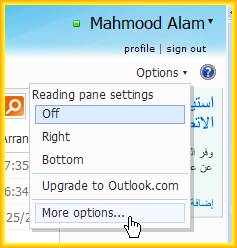
5. Click on more options link.

6. Click on 'Account dtails(password, aliases, time zone)' link, under 'Managing your account' heading.


7. Here you will be asked your password again. Type your current password and sign in.

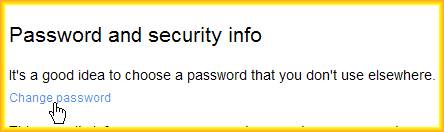
8. Click on Change password link.
9. Type your current password in first box, new password in second box, Retype youe new password in third box.
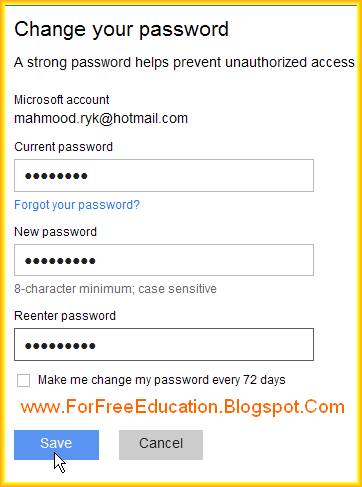
10. Click on save button.

11. You will be informed by the message that your password has been changed.

Comments

hackertr said…
This comment has been removed by a blog administrator.
Unknown said…
Thanks for sharing,this method is very useful i am very impressed,great post and information,more information..........Hotmail Support,Please visit the link Hotmail Technical Support

Popular posts from this blog

Bus Topology Advantages Disadvantages

Bus Topology Bus topology is the simplest network topology . In bus topology , all computers in network are connected to a common communication wire. This wire is called BUS. Terminators are used at both ends of wire. Bus Topology is Cheap, easy to handle and implement. Bus Topology require less cable. Bus Topology is best suited for small networks. Working of Bus Topology with Advantages and Disadvantages Advantages of Bus Network Topology 1. It is very simple topology . 2. It is easy to use. 3. It needs small amount of wire for connecting computers. 4. It is less expensive due to small wire needed. 5. If one computer fails, it does not disturb the other computers in network. Other computers will continue to share information and other resources with other connected computers. Disadvantages of Bus Network Topology 1. Only small number of computers can be connected in a bus network . 2. Network speed slows down as the number of computer increases in b...

Explain Different Types Of Data

DATA Data is the collection of raw facts and figures. It is without any proper meaning. Data may be collection of words, numbers, graphics or sounds. What is data? Explain different types of data Examples of Data 1) Student Data on Admission Forms When students get admission in a college. They fill admission form. This form     contains raw facts (data of student) like name, father’s name, address of student etc. 2)    Data of Citizens During census, data of all citizens is collected. 3)    Survey Data Different companies collect data by survey to know the opinion of people about their product. 4)    Students Examination data In examination data about obtained marks of different subjects for all students is collected.    Different Types Of Data There are following main types of Data. 1)    NUMERIC DATA Numeric data consists of 0 to 9 digits, + and – sign and dec...

Explain Main Difference Between System Software and Application Software

Topic: Explain Main Difference Between System Software and Application Software            Differentiate between system software and application software Before , explaining the main differences between application software and system software, let us know the definitions of Application software and System software with examples. What is System Software: System software is a set of programs to control all components of computer and to manage overall operations of computer system. Differences between System software and application software System software is used as a base to install and run all application software. Examples of system software include: Operating Systems, like Microsoft Windows, DOS, Unix and Linux Device Drivers like Device driver software of a Printer (found on CD normally provided with the printer) Utility Programs like AVAST anti virus, Disk Scanners and File Viewers etc. What is Applicat...