
How To Change Password of Hotmail Account

Sometimes, you may need to change the password of your Hotmail email account. One reason of changing password may be that your friend has seen the password and he may hack your Hotmail accont.

1. Type www.hotmail.com and press enter key.

2. Type your username and password and click sign in link.

3. Go to inbox.

4. Click on the Options link.
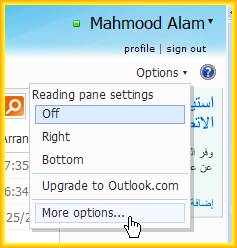
5. Click on more options link.

6. Click on 'Account dtails(password, aliases, time zone)' link, under 'Managing your account' heading.


7. Here you will be asked your password again. Type your current password and sign in.

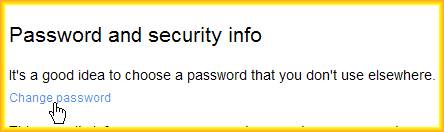
8. Click on Change password link.
9. Type your current password in first box, new password in second box, Retype youe new password in third box.
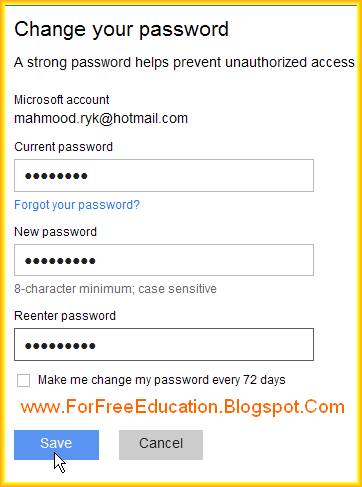
10. Click on save button.

11. You will be informed by the message that your password has been changed.

Comments

hackertr said…
This comment has been removed by a blog administrator.
Unknown said…
Thanks for sharing,this method is very useful i am very impressed,great post and information,more information..........Hotmail Support,Please visit the link Hotmail Technical Support

Popular posts from this blog

Explain Main Difference Between System Software and Application Software

Topic: Explain Main Difference Between System Software and Application Software            Differentiate between system software and application software Before , explaining the main differences between application software and system software, let us know the definitions of Application software and System software with examples. What is System Software: System software is a set of programs to control all components of computer and to manage overall operations of computer system. Differences between System software and application software System software is used as a base to install and run all application software. Examples of system software include: Operating Systems, like Microsoft Windows, DOS, Unix and Linux Device Drivers like Device driver software of a Printer (found on CD normally provided with the printer) Utility Programs like AVAST anti virus, Disk Scanners and File Viewers etc. What is Applicat...

HTML Table Tag Basics

Tables Tables are very important to show data in the form of rows and columns. Tables make data more readable and easy to understand. A table consists of rows, columns and cells. HTML Tags To Make A Table As we know that there are basically three elements in a table, that is, rows, columns and cells. So, there are the following basic tags to create a table in an HTML web page: <TABLE> tag <TR> tag <TD> tag <TH> tag   <TABLE> Tag <Table> tag is used to specify the start of a table. It also specifies some attributes of the table like ALIGN and BORDER attributes etc. Example 1: <Table>                    => Table without a border. Example 2: <Table border="1">     => Table with a border of width 1. Example 3: <Table align="left" border="2">  => A left aligned Table with a border of width 2. ...

Computer Hardware Test Interview VIVA

Q1. Define Hardware. What are different types of hardware? The physical parts of a computer are called hardware. Hardware can be touched or seen by us. Different types of hardware components are as follows: Input devices (keyboard, mouse, scanner, digital camera etc.) The Central Processing unit (CPU/Processor) Output devices (monitor, printer, plotter, speaker, data projector etc.) Memory chips (RAM, ROM etc.) Storage devices (hard disk, Floppy disk, CD, DVD etc.) Q2. Define Input devices. INPUT DEVICES:Input devices are used to enter data and instructions into computer memory from external world. Examples include: Keyboard, Mouse, Track ball, Track Pad, Joy stick, Touch Screen, Light pen, Touch Screen, Scanner, Digital Camera, Microphone, Q3. Define Output device. Output devices:Out put devices are used to display results of processing to the user. They perform the following functions: Examples include: Monitor, printer, plotter, speaker Pr...